Rest API Module
What's a REST api? REST stands for Representational State Transfer. (It is sometimes spelled "REST".) It relies on a stateless, client-server, cacheable communications protocol -- and in virtually all cases, the HTTP protocol is used.
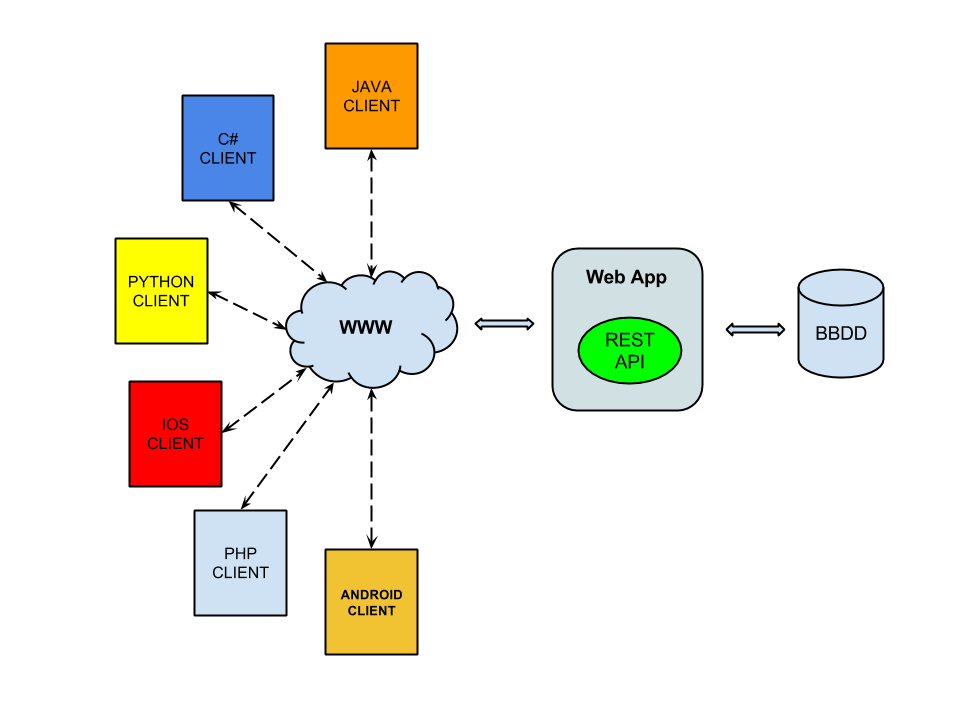
REST is an architecture style for designing networked applications. The idea is that, rather than using complex mechanisms such as CORBA, RPC or SOAP to connect between machines, simple HTTP is used to make calls between machines.
Much like Web Services, a REST service is:
- Platform-independent (you don't care if the server is Unix, the client is a Mac, or anything else)
- Language-independent (C# can talk to Java, etc.)
- Standards-based (runs on top of HTTP)
- Can easily be used in the presence of firewalls
To activate this module, follow this steps:
- Add awe-rest dependencies to pom.xml descriptor.
<dependencies>
...
  <dependency>
    <groupId>com.almis.awe</groupId>
    <artifactId>awe-rest-spring-boot-starter</artifactId>
  </dependency>
...
</dependencies>
AWE Rest configuration properties
This module supports two REST authentication modes:
local-jwt(default): AWE issues and validates local JWTs through/api/authenticate.oauth2-resource-server(opt-in): AWE validates externally issued OAuth2/OIDC access tokens (for example Entra ID, Keycloak), and/api/authenticateis not used.
Local JWT properties
| Key | Default value | Description |
|---|---|---|
awe.rest.api.auth.mode | local-jwt | REST authentication mode (local-jwt or oauth2-resource-server) |
awe.rest.api.jwt.authorization-header | Authorization | Authentication header name |
awe.rest.api.jwt.prefix | Bearer | JWT token prefix |
awe.rest.api.jwt.secret | ${awe.security.master.key} | JWT secret for local token signing |
awe.rest.api.jwt.issuer | AWE ISSUER | Local JWT issuer |
awe.rest.api.jwt.expiration-time | 60m | Local JWT expiration |
OAuth2 Resource Server and Swagger UI properties
For the complete property list, defaults, and descriptions, see the AWE Rest properties documentation.
Microsoft Entra ID example
Use two App registrations for local Swagger UI testing:
- AWE REST API: exposes the protected API scope and is the resource server audience.
- AWE Swagger UI: public SPA client used by Swagger UI to run Authorization Code + PKCE.
Register the AWE REST API application
In Azure Portal, open Microsoft Entra ID → App registrations → New registration. Create the API registration and note these values:
- Application (client) ID: used as
<api-application-client-id>. - Directory (tenant) ID: used as
<tenant-id>.
Then configure the API registration:
- Open Expose an API.
- Set the Application ID URI. The default value
api://<api-application-client-id>is valid. - Add an enabled scope, for example
access. The full scope becomesapi://<api-application-client-id>/access. - In the app manifest, set
requestedAccessTokenVersionto2so access tokens use the Entra ID v2 issuer.
Register the Swagger UI client application
Create a second App registration for Swagger UI, for example AWE Swagger UI Dev. In Authentication, add a Single-page application platform with this redirect URI:
http://localhost:8080/swagger-ui/oauth2-redirect.html
If your local server uses another port or context path, adjust the URI accordingly. Do not configure a client secret for Swagger UI, and do not keep the same redirect URI under the Web platform, because browser token redemption must use the SPA client type. Implicit grant checkboxes such as Access tokens or ID tokens are not required for Authorization Code + PKCE.
Grant Swagger UI permission to the API
In the AWE Swagger UI registration:
- Open API permissions → Add a permission → My APIs.
- Select the AWE REST API registration.
- Select the
accessscope. - Grant admin consent if your tenant policy requires it.
Example configuration:
awe.rest.api.auth.mode=oauth2-resource-server

# Match the token issuer exactly. Entra ID v2 tokens end with /v2.0.
awe.rest.api.oauth2-resource-server.jwt.issuer-uri=https://login.microsoftonline.com/<tenant-id>/v2.0

# Match the access token aud claim exactly. Entra ID may emit the bare API client id,
# even when the requested scope uses api://<api-application-client-id>/access.
awe.rest.api.oauth2-resource-server.jwt.audiences[0]=<api-application-client-id>

awe.rest.api.openapi.oauth2.authorization-url=https://login.microsoftonline.com/<tenant-id>/oauth2/v2.0/authorize
awe.rest.api.openapi.oauth2.token-url=https://login.microsoftonline.com/<tenant-id>/oauth2/v2.0/token
awe.rest.api.openapi.oauth2.client-id=<swagger-ui-application-client-id>
awe.rest.api.openapi.oauth2.use-pkce=true

# Escape ':' in .properties keys and keep the full scope key inside brackets.
awe.rest.api.openapi.oauth2.scopes.[api\://<api-application-client-id>/access]=Access AWE REST API
If AWE returns The iss claim is not valid, decode the access token and verify that issuer-uri matches the token iss claim. If AWE returns Token audience is not accepted, configure awe.rest.api.oauth2-resource-server.jwt.audiences with the exact token aud claim.
Services
AWE REST API provides AUTHENTICATE, QUERY and MAINTAIN, grouped by Protected API (authentication required) and
Public API (no authentication required).
Authentication behavior depends on the configured mode:
- local-jwt: authenticate against
/api/authenticate, then use returned JWT inAuthorization: Bearer <token>. - oauth2-resource-server: obtain access token from your identity provider and call AWE directly with
Authorization: Bearer <access_token>.
/api/authenticateis local-jwt-only and is not an OAuth2 token endpoint. OAuth2 Resource Server mode does not provision or synchronize localopeusers, and it does not add fine-grained query/maintain authorization or a read/write REST permission model.
available here.
| Service | Method | Path | Require authentication | Description |
|---|---|---|---|---|
| authenticate | POST | /api/authenticate | false | Used to authentication. Provide a JWT token to set as http header (Default value Authorization) in protected services |
| data | POST | /api/data/{queryId} | true | Used to launch application queries. In local-jwt mode authenticate first with /api/authenticate; in oauth2-resource-server mode send an external provider access token. |
| maintain | POST | /api/maintain/{maintainId} | true | Used to launch application maintains. In local-jwt mode authenticate first with /api/authenticate; in oauth2-resource-server mode send an external provider access token. |
Authenticate service
The authenticate service has the following inputs:
| Input | Use | Type | Description | Value |
|---|---|---|---|---|
| username | Required | Query parameter | Is the user name to authenticate | Ex.: test |
| password | Required | Query parameter | Is the user password to authenticate | Ex.: test |
The authenticate service has the following outputs:
| OutPut | Type | Description |
|---|---|---|
| username | String | Is the user name for which the token has been generated. |
| token | String | Is the jwt token. Used to authentication process. Note: If you want call /api/data or /api/maintain rest api, you have to send this parameter as http header in the request |
| issuer | String | Is the jwt issuer |
| expiresAt | DateTime | Expiration time of jwt token |
Note: The output is in
JSONformat
This is example of json output
{
  "expiresAt": "2021-04-26T16:16:18.000+00:00",
  "issuer": "AWE issuer",
  "token": "eyJ0eXAiOiJKV1QiLCJhbGciOiJIUzUxMiJ9.eyJzdWIiOiJ0ZXN0IiwiaXNzIjoiQVdFIElTU1VFUiIsImV4cCI6MT",
  "username": "foo"
}
Query service
The data service has the following inputs:
| Input | Use | Type | Description | Value |
|---|---|---|---|---|
| queryId | Required | URI query parameter | URI parameter to set the name of query in the request | Ex.: UsrLst |
| RequestParameter | Optional | Json object (body) | Parameter list of query in JSON format | Ex.: {"parameters": {"parName1": "value1","parName2": "value2","parName3": ["valueList1","valueList2","valueList3"]}} |
The data service has the following outputs:
| OutPut | Type | Description |
|---|---|---|
| type | String | Result of operation (ok, info, warning, error) |
| title | String | Title of response |
| message | String | Message response |
| dataList | Json object | Data result of query service |
Note: The output is in
JSONformat
Maintain service
The maintain service as POST has the following inputs:
| Input | Use | Type | Description | Value |
|---|---|---|---|---|
| maintainId | Required | URI query parameter | URI parameter to set the name of maintain in the request | Ex.: UsrDel |
| RequestParameter | Optional | Json object (body) | Parameter list of query in JSON format | Ex.: {"parameters": {"IdeOpe": 2} } |
The maintain service has the following outputs:
| OutPut | Type | Description |
|---|---|---|
| type | String | Result of operation (ok, info, warning, error) |
| title | String | Title of response |
| message | String | Message response |
| resultDetails | Json object | Maintain result details |
Note: The output is in
JSONformat
Client API Rest examples
OAuth2 Resource Server quick examples
Delegated user flow (Swagger UI)
- Configure Swagger UI OAuth2 metadata (
authorization-url,token-url,scopes, and publicclient-id). - Open
/swagger-ui/. - Use Authorize and complete Authorization Code + PKCE login in your provider.
- Invoke protected
/api/data/**or/api/maintain/**endpoints.
Spring Boot web app with user login (Authorization Code)
Use this flow when a Spring Boot web application calls AWE REST on behalf of the signed-in user. The Spring Boot application is a confidential Web client and uses a client secret.
Identity provider setup:
| Application | Required configuration |
|---|---|
| AWE REST API | Expose a delegated scope, for example api://<api-application-client-id>/access. |
| Spring Boot web app | Add a Web redirect URI such as http://localhost:9090/login/oauth2/code/entra, create a client secret, and grant the delegated API scope. |
Spring Boot client configuration example:
spring.security.oauth2.client.registration.entra.client-id=<spring-boot-client-id>
spring.security.oauth2.client.registration.entra.client-secret=<spring-boot-client-secret>
spring.security.oauth2.client.registration.entra.authorization-grant-type=authorization_code
spring.security.oauth2.client.registration.entra.redirect-uri={baseUrl}/login/oauth2/code/{registrationId}
spring.security.oauth2.client.registration.entra.scope=openid,profile,email,api://<api-application-client-id>/access

spring.security.oauth2.client.provider.entra.issuer-uri=https://login.microsoftonline.com/<tenant-id>/v2.0
Controller example using the authorized user's access token:
@GetMapping("/call/simple-get-all")
@ResponseBody
String callSimpleGetAll(@RegisteredOAuth2AuthorizedClient("entra") OAuth2AuthorizedClient authorizedClient) {
  return webClient.post()
    .uri("http://localhost:8080/api/data/SimpleGetAll")
    .contentType(MediaType.APPLICATION_JSON)
    .headers(headers -> headers.setBearerAuth(authorizedClient.getAccessToken().getTokenValue()))
    .bodyValue(Map.of("parameters", Map.of()))
    .retrieve()
    .bodyToMono(String.class)
    .block();
}
Backend service without user login (Client Credentials)
Use this flow when a backend service calls AWE REST as the application itself, without a browser login or user context. The identity provider issues an application token after admin consent has been granted.
Identity provider setup:
| Application | Required configuration |
|---|---|
| AWE REST API | Define an application app role, for example access_as_application, with Applications as an allowed member type. |
| Backend service | Create a client secret or certificate, assign the API app role under Application permissions, and grant admin consent. |
Spring Boot client configuration example:
spring.security.oauth2.client.registration.entra-client.client-id=<backend-client-id>
spring.security.oauth2.client.registration.entra-client.client-secret=<backend-client-secret>
spring.security.oauth2.client.registration.entra-client.authorization-grant-type=client_credentials
spring.security.oauth2.client.registration.entra-client.scope=api://<api-application-client-id>/.default

spring.security.oauth2.client.provider.entra-client.token-uri=https://login.microsoftonline.com/<tenant-id>/oauth2/v2.0/token
Programmatic token acquisition example:
@Bean
OAuth2AuthorizedClientManager authorizedClientManager(ClientRegistrationRepository registrations,
                                                      OAuth2AuthorizedClientService clients) {
  OAuth2AuthorizedClientProvider provider = OAuth2AuthorizedClientProviderBuilder.builder()
    .clientCredentials()
    .build();
  AuthorizedClientServiceOAuth2AuthorizedClientManager manager =
    new AuthorizedClientServiceOAuth2AuthorizedClientManager(registrations, clients);
  manager.setAuthorizedClientProvider(provider);
  return manager;
}

@GetMapping("/call/simple-get-all-client")
@ResponseBody
String callSimpleGetAllClient() {
  OAuth2AuthorizeRequest request = OAuth2AuthorizeRequest.withClientRegistrationId("entra-client")
    .principal("awe-rest-client")
    .build();
  OAuth2AuthorizedClient client = authorizedClientManager.authorize(request);

  return webClient.post()
    .uri("http://localhost:8080/api/data/SimpleGetAll")
    .contentType(MediaType.APPLICATION_JSON)
    .headers(headers -> headers.setBearerAuth(client.getAccessToken().getTokenValue()))
    .bodyValue(Map.of("parameters", Map.of()))
    .retrieve()
    .bodyToMono(String.class)
    .block();
}
Application tokens usually contain roles instead of scp and do not contain user claims such as preferred_username. AWE REST builds a synthetic client principal from claims such as azp, appid, client_id, or sub.
- Login client example (local-jwt mode)
// Authenticate
@Test
public void authenticateUser() {
    // Init rest template
    RestTemplate restTemplate = new RestTemplate();
    HttpHeaders headers = new HttpHeaders();
    // Build authenticate request
    UriComponentsBuilder builder = UriComponentsBuilder.fromHttpUrl("http://localhost:8080/api/authenticate"))
    .queryParam("username","test")
    .queryParam("password","test");
    HttpEntity<String> entity = new HttpEntity<>(headers);
    ResponseEntity<LoginResponse> response = restTemplate.exchange(
            builder.toUriString(),
            HttpMethod.POST,
            entity,
            LoginResponse.class);
    // LoginResponse has token info
    ...
}
- Data client example
// Data without parameters
@Test
public void protectedQueryAuthorized() {
    // Init rest template
    RestTemplate restTemplate = new RestTemplate();
    HttpHeaders headers = new HttpHeaders();
    String queryId = "query";

    //Authenticate user (call /api/authenticate to get jwt token)
    headers.add("Authorization", "Bearer " + jwtToken);

    HttpEntity<String> entity = new HttpEntity<>(headers);

    ResponseEntity<AweRestResponse> response = restTemplate.exchange("http://localhost:8080/api/data/" + queryId,
        HttpMethod.POST,
        entity,
        AweRestResponse.class);
        // AweRestResponse has response info
        ...
}
// Data with parameters
@Test
public void protectedQueryParametersAuthorized() {
    // Init rest template
    RestTemplate restTemplate = new RestTemplate();
    HttpHeaders headers = new HttpHeaders();
    String queryId = "query";

    //Authenticate user (call /api/authenticate to get jwt token)
    headers.add("Authorization", "Bearer " + jwtToken);

    // Build parameters request
    headers.setContentType(MediaType.APPLICATION_JSON);
    RequestParameter parameters = new RequestParameter();
    Map<String, Object> paramMap = new HashMap<>();
    paramMap.put("param1", 1);
    paramMap.put("param2", "value2");
    paramMap.put("param3", Arrays.asList("value1", "value2"));
    parameters.setParameters(paramMap);

    HttpEntity<RequestParameter> entity = new HttpEntity<>(parameters, headers);
    ResponseEntity<AweRestResponse> response = restTemplate.exchange("http://localhost:8080/api/data/" + queryId,
        HttpMethod.POST,
        entity,
        AweRestResponse.class);
        // AweRestResponse has response info
        ...
}
- Maintain client example
// Maintain without parameters
@Test
public void protectedMaintainAuthorized() {
    // Init rest template
    RestTemplate restTemplate = new RestTemplate();
    HttpHeaders headers = new HttpHeaders();
    String maintainId = "MAINTAIN";

    //Authenticate user (call /api/authenticate to get jwt token)
    headers.add("Authorization", "Bearer " + jwtToken);

    HttpEntity<String> entity = new HttpEntity<>(headers);

    ResponseEntity<AweRestResponse> response = restTemplate.exchange("http://localhost:8080/api/maintain/" + maintainId,
    HttpMethod.POST,
    entity,
    AweRestResponse.class);
    // AweRestResponse has response of maintain result
    ...
}
// Maintain with parameters
@Test
public void protectedMaintainParametersAuthorized() {
    // Init rest template
    RestTemplate restTemplate = new RestTemplate();
    HttpHeaders headers = new HttpHeaders();
    String maintainId = "MAINTAIN";

    // Build parameters request
    headers.setContentType(MediaType.APPLICATION_JSON);
    RequestParameter parameters = new RequestParameter();
    Map<String, Object> paramMap = new HashMap<>();
    paramMap.put("userId", 1);
    parameters.setParameters(paramMap);

    //Authenticate user (call /api/authenticate to get jwt token)
    headers.add("Authorization", "Bearer " + jwtToken);

    HttpEntity<RequestParameter> entity = new HttpEntity<>(parameters, headers);
    ResponseEntity<AweRestResponse> response = restTemplate.exchange("http://localhost:8080/api/maintain/" + maintainId,
    HttpMethod.POST,
    entity,
    AweRestResponse.class);
    // AweRestResponse has response of maintain result
    ...
}