Actions
To perform an action when we click a button, or a dependency is activated, we need to define a button-action or a dependency-action. The format of these actions is the next one:
<button-action type="[action]" target="[action-target]" context="[action-context]" silent="[silent]" async="[async]"
               server-action="[server-action]" target-action="[server-target-action]"/>
or
<dependency-action type="[action]" target="[action-target]" context="[action-context]" silent="[silent]" async="[async]"
                   server-action="[server-action]" target-action="[server-target-action]"/>
Action attributes
| Attribute | Use | Type | Description | Values |
|---|---|---|---|---|
type | Required | String | Action to be launched. | See client action list |
target | Optional | String | Target of the action | Option, message or component identifier, depending on the action type |
context | Optional | String | Context where the target is | View where the component is or screen context |
server-action | Optional | String | Server action call | See server action list |
target-action | Optional | String | Target to call on the server | |
silent | Optional | Boolean | Launch the action without showing the loading bar | |
async | Optional | Boolean | Launch the action in the async stack | |
value | Optional | String | Value to set to the criterion in case action is "value" type |
Client actions
Client actions are processes launched in the client-side of the web application (on the web browser). They are launched sequentially (unless defined as async). Depending on the action type, the target and context attributes may differ in meaning.
General
Actions retrieved by the application to execute a generic action. These actions does not need extra attributes and apply to all components on the screen.
General actions
| Action | Description |
|---|---|
reset | Empty all criteria on the screen |
restore | Restore to initial values all criteria on the screen |
restore-target | Restore to target values all criteria on the screen |
validate | Launch a validation on all criteria on the screen |
print | Launch a screen print. Same as navigator print option |
confirm-updated-data | Launch a confirm dialog to warn the user that there are criteria with data in the screen, and may lost them when navigating to another screen |
confirm-not-updated-data | Launch a confirm dialog to warn the user that the criteria in the screen have not been updated |
confirm-empty-data | Launch a confirm dialog to warn the user that all the criteria in the screen are empty |
resize | Launch a screen resize (useful for screen size changes) |
toggle-menu | Show/Hide the menu |
toggle-navbar | Show/Hide the navigation bar |
disable-dependencies | Disable the dependency system |
enable-dependencies | Enable the dependency system |
cancel | Clear the current stack |
value | Set a value to a criterion |
wait | Wait an amount of milliseconds defined on target attribute |
close-window | Tries to close the current browser window (sometimes it'll ask to the user) |
update-theme | Reload the theme stylesheet to retrieve theme changes without reloading the screen |
get-file | Download a file from the server. The file to retrieve is identified by the filename parameter |
change-menu | Replace the current menu options with the options received on the options parameter |
Message
Actions that eventually can show a message to the user.
Message actions
| Action | Description |
|---|---|
confirm | Launch a confirm dialog with the message defined on target attribute |
Message attributes
| Attribute | Use | Type | Description | Values |
|---|---|---|---|---|
target | Required | String | Message identifier |
Navigation
Navigation actions are used to move from one screen to another.
Navigation actions
| Action | Description |
|---|---|
back | Go to the previous screen. Same as navigator back button. Does not need target attribute. |
screen | Go to a screen. Needs target attribute. |
reload | Reload current screen |
reload-page | Fully reload the browser page, like a manual refresh. Unlike reload (which re-runs the current screen inside the SPA), it re-fetches everything from the server, so it also picks up structural changes. Used by the development hot reload to refresh the browser automatically. Does not need target attribute. |
logout | Log out and exit the private menu. Does not need target attribute. |
redirect | Redirects the current screen to a new URL defined in target attribute. If parameter newWindow is set to true, the URL will be open in a new window |
redirect-screen | Launches a redirect action if the current screen matches the screen parameter |
Navigation attributes
| Attribute | Use | Type | Description | Values |
|---|---|---|---|---|
target | Depends on action | String | Option identifier | |
context | Optional | String | Context of the screen. If not defined, the context is the same as the launcher screen has. | screen/public for public options, screen/home for private options |
newWindow | Optional | Boolean | Open the redirect url in a new window. | |
screen | Depends on action | String | Screen to check when launching the redirect-screen action. |
Component
Actions which works over components in the screen.
Component actions
| Action | Description | Works on |
|---|---|---|
add-class | Add the css class/classes defined on target-action to the tag with the selector defined on target | tag |
remove-class | Remove the css class/classes defined on target-action to the tag with the selector defined on target | tag |
toggle-class | Toggle the css class/classes defined on target-action to the tag with the selector defined on target | tag |
reset | Empty a criterion value | criteria, grid, chart |
restore | Restore to initial values a criterion | criteria, grid, chart |
start-load | Sets a component as loading | criteria, grid, chart |
copy-criterion-value-clipboard | Copy a criterion value to the clipboard | criteria |
validate | Launch a validation on the criterion or criteria inside the target tag | tag, criteria |
set-valid | Set a criterion as valid, clearing its previous validation error | criteria |
set-invalid | Set a criterion as invalid, showing the message defined on the message parameter | criteria |
fill-suggest | Fill the available and selected values of a suggest criterion with the values parameter | criteria |
update-controller | Update the controller attribute defined on the attribute parameter with the value received | Any component |
dialog | Opens a modal dialog | dialog |
close | Closes a dialog | dialog |
close-cancel | Closes a dialog cancelling the actions stack which opened it | dialog |
filter | Reload a grid | grid |
add-row | Add an empty row at the bottom of the grid | grid |
add-row-top | Add an empty row at the top of the grid | grid |
add-row-up | Add an empty row over the selected row | grid |
add-row-down | Add an empty row below the selected row | grid |
copy-row | Copy the selected row at the bottom of the grid | grid |
copy-row-top | Copy the selected row at the top of the grid | grid |
copy-row-up | Copy the selected row over the selected row | grid |
copy-row-down | Copy the selected row below the selected row | grid |
delete-row | Delete the selected row | grid |
save-row | Save the selected row | grid |
cancel-row | Cancel the edition of the selected row | grid (editable) |
check-one-selected | Checks if there is one row selected | grid |
check-some-selected | Checks if there is one or more rows selected | grid |
check-records-saved | Checks if all records are stored (user is not editing a row) | grid |
check-records-generated | Checks if there is at least one row in the grid | grid |
select-first-row | Selects the first row of the grid | grid |
select-last-row | Selects the last row of the grid | grid |
select-all-rows | Select all rows of the grid | grid |
unselect-all-rows | Unselect all rows of the grid | grid |
validate-selected-row | Launch a validation on the selected row of the grid | grid |
copy-selected-rows-clipboard | Copy the selected rows on the grid to the clipboard | grid |
show-columns | Show the grid columns defined on the columns parameter | grid |
hide-columns | Hide the grid columns defined on the columns parameter | grid |
tree-branch | Add the rows received on the datalist parameter as children of the expanding branch | grid (tree) |
change-theme | Changes the theme to the value defined on the target criterion | criteria |
change-language | Changes the language to the value defined on the target criterion | criteria |
reload-language | Reload the language searching for changes | criteria |
next-step | Move to the next step of the wizard | wizard |
prev-step | Move to the previous step of the wizard | wizard |
first-step | Move to the first step of the wizard | wizard |
last-step | Move to the last step of the wizard | wizard |
nth-step | Move to the nth step of the wizard | wizard |
add-points | Add the points received on the data parameter to the chart series | chart |
set-pivot-sorters | Set the field sort order of a pivot table with the sorters parameter | pivot |
set-pivot-group-rows | Set the fields used as row groups, defined as a comma-separated list on the rows parameter | pivot |
set-pivot-group-cols | Set the fields used as column groups, defined as a comma-separated list on the cols parameter | pivot |
clear-file | Clear the uploaded file, resetting the uploader component | uploader |
taglist-data | Load the content of a taglist with the HTML and component data received from the server | taglist |
polyline | Draw a polyline on a map with the points received on the rows parameter (Lat and Lon fields) | map |
Component attributes
| Attribute | Use | Type | Description | Values |
|---|---|---|---|---|
target | Required | String | Component or tag identifier | |
context | Optional | String | Context of the component. If not defined, the context is the same as the launcher component has. | base for the menu container screen, report@home for the menu options |
Server call
Server call actions
| Action | Description |
|---|---|
server | Launch a server call with screen parameters |
server-print | Launch a server call with screen parameters and print information |
server-download | Launch a server call with screen parameters to call an action which will download a file |
Server call attributes
| Attribute | Use | Type | Description | Values |
|---|---|---|---|---|
target | Optional | String | Component or message identifier for callback | |
context | Optional | String | Context of the component for callback. If not defined, the context is the same as the launcher component has. | base for the menu container screen, report@home for the menu options |
server-action | Required | String | Action to launch on server. | See server actions |
target-action | Required | String | Target for the server action | Query identifier or Maintain identifier |
Internal actions
These actions are dispatched by the framework itself as part of the screen and component lifecycle. They are documented here for reference, and are not normally used in application XML.
Internal action list
| Action | Description |
|---|---|
screen-data | Store the screen configuration received from the server and launch the actions attached to it |
end-load | Notify a component that its data load has finished |
end-dependency | Notify the dependency controller that a dependency has finished |
file-status | Update the upload progress of an uploader component |
file-uploaded | Store the uploaded file data in the uploader model when an upload finishes |
file-downloaded | Notify a downloader component that the file download has finished |
locals-retrieved | Store the translations retrieved from the server for a language |
log-delta | Append new log lines to a log viewer component and scroll it down |
after-add-row | Launched after a row has been added to a grid |
after-delete-row | Launched after a row has been deleted from a grid |
after-save-row | Launched after a row has been saved on an editable grid |
after-cancel-row | Launched after the edition of a row has been cancelled on an editable grid |
Server actions
| Action | Description | Values |
|---|---|---|
login | Log in into the application | User and password |
logout | ||
screen | Navigate to a screen | target: Menu option identifier |
data | Get data from the server. Fills the values list of the criterion | targetAction: Query identifier |
value | Get a value from the server. Fills the selected list of the criterion. In suggests, this action also fills the values list | targetAction: Query identifier |
update-model | Get values for some criteria. The query field alias must be the criterion id to match. Fills the selected list of the criteria | targetAction: Query identifier |
subscribe | Subscribe to a query data retrieval. The subscription stores the component request and broadcasts data to the component address | targetAction: Query identifier |
maintain | Launch a maintain process | targetAction: Maintain target identifier |
maintain-silent | Launch a maintain process without response message | targetAction: Maintain target identifier |
maintain-async | Launch a maintain process without any response | targetAction: Maintain target identifier |
validate | Launch a query, and if it returns a warning or an error, invalidates the launcher with a message | targetAction: Query identifier |
unique | Launch a query, and if it returns data, invalidates the launcher | targetAction: Query identifier |
control | Launch a query, and if it doesn't finish OK, returns a message | targetAction: Query identifier |
control-cancel | Launch a query, and if it doesn't finish OK, returns a message and cancels the action queue | targetAction: Query identifier |
control-confirm | Launch a query, and if it doesn't finish OK, returns a confirm message | targetAction: Query identifier, target: Confirm message identifier |
control-confirm-cancel | Launch a query, and if it finish OK, cancels the queue and if it finishes with an error, returns a confirm message | targetAction: Query identifier, target: Confirm message identifier |
control-confirm-message | Launch a query, and if it doesn't finish OK, returns a confirm message with the query message output | targetAction: Query identifier |
control-empty-cancel | Launch a query, and if it does not return data, it shows a message and cancels the queue | targetAction: Query identifier, target: Message identifier |
control-unique-cancel | Launch a query, and if it returns data, it shows a message and cancels the queue | targetAction: Query identifier, target: Message identifier |
app-help | Shows the automatically generated screen help based on screen attributes | target: Screen identifier (optional) |
help | Get the application help book in the current language | |
get-file-maintain | Launch a maintain process and retrieve a file to download |
Client actions from Java services
These kind of actions are used to execute client actions from java services in the server. They are useful to perform many actions on window's element with a single service. For example, fill criteria and grids at once, dynamically add columns to a grid, add or replace graphic series, etc.
General actions from java services
| Action | Description | Parameters |
|---|---|---|
message | Send a message to the client (without target) | type - Message type (ok, info, warning, error), title - Message title, message- Message description |
target-message | Send a message to a client component | type - Message type (ok, info, warning, error), title - Message title, message- Message description |
screen | Navigate to a screen option. The option is defined as the action target | reload - Force the screen reload (optional) |
redirect | Redirect the browser to the URL defined as the action target | newWindow - Open the URL in a new window (optional) |
redirect-screen | Launch a redirect action only if the current screen matches the screen parameter | screen - Screen name to check against the current screen |
dialog | Open a modal dialog. The dialog identifier is defined as the action target | |
confirm | Launch a confirm dialog | title - Confirm title, message - Confirm description |
get-file | Download a file from the server | filename - Serialized file data of the file to download |
add-class | Add css classes to the elements matching the selector defined as the action target | targetAction - Space-separated css class list |
remove-class | Remove css classes from the elements matching the selector defined as the action target | targetAction - Space-separated css class list |
toggle-class | Toggle css classes on the elements matching the selector defined as the action target | targetAction - Space-separated css class list |
message
// Client action list
ServiceData serviceData = new ServiceData();

// Message action
ClientAction messageAction = new ClientAction("message");
messageAction.addParameter("type", "warning");
messageAction.addParameter("title", title);
messageAction.addParameter("message", message);
serviceData.addClientAction(messageAction);
target-message
// Client action list
ServiceData serviceData = new ServiceData();

// Message action
ClientAction messageAction = new ClientAction("target-message");
messageAction.addParameter("type", "warning");
messageAction.addParameter("title", title);
messageAction.addParameter("message", message);

// Optional
ComponentAddress address = new ComponentAddress(applicationName, null, "report", null, "CriterionId", null, null);
messageAction.setAddress(address);

serviceData.addClientAction(messageAction);
screen
public ServiceData goToScreen() {
  return new ServiceData()
    .addClientAction(new ScreenActionBuilder("MyOption").build());
}
redirect
public ServiceData redirectToUrl() {
  // Open the URL in a new window
  return new ServiceData()
    .addClientAction(new RedirectActionBuilder("https://www.example.com", true).build());
}
redirect-screen
public ServiceData redirectFromScreen() {
  // Redirect only if the current screen is "currentScreen"
  return new ServiceData()
    .addClientAction(new RedirectScreenActionBuilder("currentScreen", "https://www.example.com").build());
}
dialog
public ServiceData openDialog() {
  return new ServiceData()
    .addClientAction(new DialogActionBuilder("MyDialog").build());
}
confirm
public ServiceData confirmChanges() {
  return new ServiceData()
    .addClientAction(new ConfirmActionBuilder("CONFIRM_TITLE", "CONFIRM_MESSAGE").build());
}
get-file
public ServiceData downloadFile(FileData fileData) {
  return new ServiceData()
    .addClientAction(new DownloadActionBuilder(fileData).build());
}
add-class
public ServiceData highlightPanel() {
  return new ServiceData()
    .addClientAction(new AddCssClassActionBuilder(".panel-header", "highlight").build());
}
remove-class
public ServiceData removeHighlight() {
  return new ServiceData()
    .addClientAction(new RemoveCssClassActionBuilder(".panel-header", "highlight").build());
}
toggle-class
public ServiceData togglePanel() {
  return new ServiceData()
    .addClientAction(new ToggleCssClassActionBuilder(".panel-header", "expanded").build());
}
Criteria actions from java services
| Action | Description | Parameters |
|---|---|---|
select | Fill a criterion selected values | values - Datalist with criteria value |
fill | Fill a criterion list of available values | rows - rows of datalist (at least must have value and label fields) |
fill-suggest | Fill the available and selected values of a suggest criterion | values - List of suggest values (with value and label fields) |
update-controller | Update an attribute of a component controller | attribute - Controller attribute to update, value - Value to set (or datalist - DataList whose first row value field is used) |
select
ServiceData setCriteriaValue() {
 // Variable initialization
 ServiceData serviceData = new ServiceData();

 // Create client action to fill criteria
 ClientAction selectCrtTransactionIdAction = new ClientAction("select");

 // Set target (Criteria ID to set value)
 selectCrtTransactionIdAction.setTarget("transactionId");

 // Add parameters to actions
 selectCrtTransactionIdAction.addParameter("values", Arrays.asList("TR001"))

 // Add actions to serviceData
 serviceData.addClientAction(selectCrtTransactionIdAction);

 return serviceData;
}
fill-suggest
public ServiceData fillSuggestValues() {
  return new ServiceData()
    .addClientAction(new FillSuggestActionBuilder("SuggestCriterion",
      new SuggestValue("TR001", "Transaction 001"),
      new SuggestValue("TR002", "Transaction 002"))
      .build());
}
update-controller
public ServiceData updateButtonLabel() {
  // Update the "label" attribute of the "ButPrn" component controller
  return new ServiceData()
    .addClientAction(new UpdateControllerActionBuilder("ButPrn", "label", "BUTTON_PRINT_ALL").build());
}
Grid actions from java services
| Action | Description | Parameters |
|---|---|---|
fill | Fill a grid with datalist | rows - rows of datalist |
total - Number of total pages of datalist | ||
page - Page of datalist | ||
records - Records number of datalist | ||
add-columns | Add columns to structure grid | columns - ArrayNode with column structure |
replace-columns | Replace columns grid with other columns structure | columns - ArrayNode with column structure |
update-cell | Update cell in grid. Used to update cellData with other value, style, icon, title ... | values - ObjectNode with cell attributes |
add-row | Add a row at the bottom of the grid | row - row values (optional) |
selectedRow - Selected row identifier (optional) | ||
add-row-top | Add a row at the top of the grid | row - row values (optional) |
selectedRow - Selected row identifier (optional) | ||
add-row-up | Add a row over the selected row | row - row values (optional) |
selectedRow - Selected row identifier (optional) | ||
add-row-down | Add a row below the selected row | row - row values (optional) |
selectedRow - Selected row identifier (optional) | ||
copy-row | Copy the selected row at the bottom of the grid | selectedRow - Selected row identifier (optional) |
copy-row-top | Copy the selected row at the top of the grid | selectedRow - Selected row identifier (optional) |
copy-row-up | Copy the selected row over the selected row | selectedRow - Selected row identifier (optional) |
copy-row-down | Copy the selected row below the selected row | selectedRow - Selected row identifier (optional) |
update-row | Update the selected row values | row - row values, rowId - id of row to be updated (if none given, selected one will be selected), style - CSS class to add to the row (optional) |
delete-row | Delete the selected row | |
filter | Reload the grid data | |
show-columns | Show grid columns | columns - List of column identifiers to show |
hide-columns | Hide grid columns | columns - List of column identifiers to hide |
select-all-rows | Select all rows of the grid | |
unselect-all-rows | Unselect all rows of the grid |
fill
Using a list of beans as parameters:
@Data
@Accessors(chain=true)
public class MyBean {
  private String id;
  private String label;
  private Integer type;
}
The fill action should be something like:
public ServiceData fillGrid(List<MyBean> beanList) {
 return new ServiceData()
   .addClientAction(new FillActionBuilder("GridToFill", DataListUtil.fromBeanList(beanList))
     .build()
   );
}
Using parameter list the fill action should be like:
public ServiceData fillGrid(List<String> idList, List<String> labelList, List<Integer> typeList) {
  DataList dataList = new DataList();
  DataListUtil.addColumn(dataList, "id", idList);
  DataListUtil.addColumn(dataList, "label", labelList);
  DataListUtil.addColumn(dataList, "type", typeList);

  return new ServiceData()
   .addClientAction(new FillActionBuilder("GridToFill", dataList)
     .build()
   );
}
add-columns
ServiceData addColumnsToGrid() {
 // Variable initialization
 ServiceData serviceData = new ServiceData();

 // Create client action to fill many criteria
 ClientAction addColumnsAction = new ClientAction("add-columns");

 // Build dynamic column structure
List<Column> columnList = new ArrayList<Column>();
 Column columnName = new Column();
 columnName.setName("Name");
 columnName.setLabel("COLUMN_LABEL");
 columnName.setCharLength("15");
 columnName.setField("Name");
 columnName.setAlign("Center");

 // Add column to list
 columnList.add(columnName);

 // Build column structure
 ArrayNode columns = ColumnUtil.buildColumnListStructure(columnList);

 addColumnsAction.setTarget("GrdDivididendList");

 // Add parameters to action
 addColumnsAction.addParameter("columns", new CellData(columns));

 // Add action to list
 clientActionList.add(addColumnsAction);

 return serviceData;
}
replace-columns
ServiceData replaceColumnsToGrid() {
 // Variable initialization
 ServiceData serviceData = new ServiceData();

 // Create client action to fill many criteria
 ClientAction replaceColumnsAction = new ClientAction("replace-columns");

 // Build dynamic column structure
 ArrayList<Column> columnList = new ArrayList<Column>();
 Column columnName = new Column();
 column.setName("Name");
 column.setLabel("COLUMN_LABEL");
 column.setCharLength("15");
 column.setField("Name");
 column.setAlign("Center");

 Column columnType = new Column();
 columnType.setName("Type");
 columnType.setLabel("COLUMN_TYPE");
 columnType.setCharLength("15");
 columnType.setField("Type");
 columnType.setAlign("Center");

 // Add column to list
 columnList.add(columnName );
columnList.add(columnType );

 // Build column structure
 ArrayNode columns = ColumnUtil.buildColumnListStructure(columnList);

 replaceColumnsAction.setTarget("GrdDivididendList");

 // Add parameters to action
 replaceColumnsAction.addParameter("columns", new CellData(columns));

 // Add action to list
 clientActionList.add(replaceColumnsAction);

 return serviceData;
}
update-cell
...
 // Variable initialization
 ServiceData serviceData = new ServiceData();

 ClientAction updateCell = new ClientAction("update-cell");

 // Set values
 ObjectNode values = JsonNodeFactory.instance.objectNode();
 values.put("value", value);
 values.put("label", label);
 values.put("style", "updated");

 // Build address of cell
 ComponentAddress address = new ComponentAddress(applicationName, null, "report", null, "GrdSwapLst", idRow, idColumn);
 updateCell.setAddress(address);
 updateCell.setAsync("true");
 updateCell.setSilent("true");
 updateCell.addParameter("data", new CellData(values));

 // Add action to list
 clientActionList.add(updateCell);

 return serviceData;
Note: If you want to change only a value, only passing the value to the
dataparameter inside aCellDatais necessary. If you want to change anything more, then there'll be necessary to generate a JSON object with the model you want to update. In this model you must include thevalueandlabelattributes.
filter
public ServiceData reloadGrid() {
  return new ServiceData()
    .addClientAction(new FilterActionBuilder("GrdLst").build());
}
show-columns
public ServiceData showColumns() {
  return new ServiceData()
    .addClientAction(new ShowColumnsActionBuilder("GrdLst", "name", "type").build());
}
hide-columns
public ServiceData hideColumns() {
  return new ServiceData()
    .addClientAction(new HideColumnsActionBuilder("GrdLst", "name", "type").build());
}
select-all-rows
public ServiceData selectAllRows() {
  return new ServiceData()
    .addClientAction(new SelectAllRowsActionBuilder("GrdLst").build());
}
unselect-all-rows
public ServiceData unselectAllRows() {
  return new ServiceData()
    .addClientAction(new UnselectAllRowsActionBuilder("GrdLst").build());
}
Chart actions from java services
| Action | Description | Parameters |
|---|---|---|
replace-chart-series | Replace the series of one chart | series - ArrayNode with chart series |
add-chart-series | Add one serie to chart | series - ArrayNode with chart serie |
remove-chart-series | Remove the series of one chart | series - ArrayNode with chart series |
add-points | Add points to the chart series | data - DataList with the points to add to each serie |
replace-chart-series
/**
   * Test method to replace the series of chart
   *
   * @param userList (Dummy list for build name of series)
   * @return
   * @throws AWException
   */
  public ServiceData replaceSeriesChart(List<String> userList) throws AWException {

    // Init variables
    ServiceData serviceData = new ServiceData();
    List<ClientAction> clientActionList = serviceData.getClientActionList();
    JsonNodeFactory factory = JsonNodeFactory.instance;
    ArrayNode serieList = factory.arrayNode();

    // Get month list for xAxis
    List<String> months = builDummyMonthList();

    // Add json data of series
    for (String user : userList) {
      // New serie
      ChartSerie serie = new ChartSerie();
      serie.setId(user);
      serie.setName(user);

      // Add data to serie
      for (String month : months) {
        ChartSeriePoint point = new ChartSeriePoint(factory.textNode(month), factory.numberNode(new Random().nextInt((10 - 0) + 1) + 0));
        // Add point to serie [x,y]
        serie.getData().add(point);
      }
      // Add serie
      serieList.add(serie.toJson());
    }

    // Create action replace series of chart
    ClientAction replaceSeriesAction = new ClientAction("replace-chart-series");
    replaceSeriesAction.setTarget("ChrLinTst");
    ArrayList<Parameter> parameterList = replaceSeriesAction.getParameterList();
    parameterList.add(new Parameter("series", new CellData(serieList)));
    // Add action to list
    clientActionList.add(replaceSeriesAction);

    return serviceData;
  }
add-chart-series
/**
   * Test method to add the series of chart
   *
   * @param userList (Dummy list for build name of series)
   * @return
   * @throws AWException
   */
  public ServiceData addSeriesChart(List<String> userList) throws AWException {

    // Init variables
    ServiceData serviceData = new ServiceData();
    List<ClientAction> clientActionList = serviceData.getClientActionList();
    JsonNodeFactory jsonFactory = JsonNodeFactory.instance;
    // Get month list for xAxis
    List<String> months = builDummyMonthList();

    // Create arrayNode of chart series
    ArrayNode serieList = jsonFactory.arrayNode();

    // Add json data of series
    for (String user : userList) {
      // New serie
      ChartSerie serie = new ChartSerie();
      serie.setId(user);
      serie.setName(user);

      // Add data to serie
      for (String month : months) {
        ChartSeriePoint point = new ChartSeriePoint(jsonFactory.textNode(month), jsonFactory.numberNode(new Random().nextInt((10 - 0) + 1) + 0));
        // Add point to serie [x,y]
        serie.getData().add(point);
      }
      // Add serie
      serieList.add(serie.toJson());
    }

    // Create action add series of chart
    ClientAction addSeriesAction = new ClientAction("add-chart-series");
    addSeriesAction.setTarget("ChrLinTst");
    ArrayList<Parameter> parameterList = addSeriesAction.getParameterList();
    parameterList.add(new Parameter("series", new CellData(serieList)));
    // Add action to list
    clientActionList.add(addSeriesAction);

    return serviceData;
  }
remove-chart-series
/**
   * Test method to remove the series of chart
   *
   * @param userList (Dummy list for build name of series)
   * @return
   * @throws AWException
   */
  public ServiceData removeSeriesChart(List<String> userList) throws AWException {

    // Init variables
    ServiceData serviceData = new ServiceData();
    List<ClientAction> clientActionList = serviceData.getClientActionList();
    JsonNodeFactory jsonFactory = JsonNodeFactory.instance;

    // Create arrayNode of chart series
    ArrayNode series = jsonFactory.arrayNode();

    // Add json data of series
    for (String user : userList) {
      ChartSerie serie = new ChartSerie();
      serie.setId(user);
      // Add serie
      series.add(serie.toJson());
    }

    // Create action remove series of chart
    ClientAction removeSeriesAction = new ClientAction("remove-chart-series");
    removeSeriesAction.setTarget("ChrLinTst");
    ArrayList<Parameter> parameterList = removeSeriesAction.getParameterList();
    parameterList.add(new Parameter("series", new CellData(series)));
    // Add action to list
    clientActionList.add(removeSeriesAction);

    return serviceData;
  }
add-points
public ServiceData addPointsToChart() {
  // Build the points to add: each row holds the value for each serie
  DataList dataList = new DataList();
  DataListUtil.addColumn(dataList, "date", Arrays.asList("2020-01"));
  DataListUtil.addColumn(dataList, "serie1", Arrays.asList(4));

  return new ServiceData()
    .addClientAction(new AddPointsActionBuilder("ChrLin", dataList).build());
}
Actions stack
Actions are launched sequentially. They are stored in an actions stack, and when the current action has finished, the next one is launched.
There are some actions that can clean the actions stack, like the cancel client action. Other actions freeze the current stack and creates another stack in an upper level, like the dialog client action.
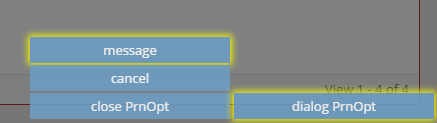
Async stack
When you launch an action with the async flag activated, it is launched on the async stack. It is executed asynchronously, and does not wait for any other action.
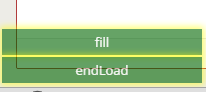
Show the stack
If you want to see what the stacks are doing, you can add a delay to these actions and make them visible by typing the next keys within the application focus:
ALT + SHIFT + [number]
Where [number] is the number of seconds you want to delay every action (for example, 1);
To disable the action stack, just do the same thing delaying 0 seconds:
ALT + SHIFT + 0
Examples
Validation
Validate all criteria, launch a confirm message and after that, launch a maintain target to store the screen data:
<button-action type="validate" />
<button-action type="confirm" target="[target]" />
<button-action type="server" server-action="maintain" target-action="[maintain-target]" />
Navigation
Go to the previous screen, warning the user that the screen data may be lost
<button-action type="confirm-updated-data" />
<button-action type="back" />
Download a file stored somewhere

Screen
<criteria label="PARAMETER_TEXT" id="TxtViw" variable="ButVal" component="text-view" style="col-xs-6 col-sm-3 col-lg-2" icon="download">
  <dependency>
    <dependency-element id="TxtViw"/>
    <dependency-element id="TxtViw" event="click"/>
    <dependency-action type="server-download" server-action="get-file-maintain" target-action="downloadFile"/>
  </dependency>
  ...
</criteria>
Maintain.xml
<target name="downloadFile">
  <serve service="downloadFile">
    <variable id="fileName" type="STRING" name="TxtViw" />
  </serve>
</target>
Service.xml
<service id="downloadFile">
  <java classname="com.almis.awe.test.File" method="downloadFile">
    <service-parameter type="STRING" name="fileName" />
  </java>
</service>
Java service
/**
 * Given a file identifier, download a file
 *
 * @param fileIdentifier
 * @return ServiceData
 * @throws AWException
 */
public ServiceData downloadFile(String fileIdentifier) throws AWException {
  ServiceData serviceData = new ServiceData();
  FileController fileController = new FileController();
  FileData fileData = fileController.getFileData(fileIdentifier);

  String path = fileData.getFilePath();
  FileInputStream file = FileUtil.getFileStream(path);

  // Set variables
  fileData.setFileStream(file);
  serviceData.setData(fileData);
  return serviceData;
}