Properties
Introduction
Several properties can be specified inside your application.properties file, inside your application.yml file, or as command line switches.
This document provides a list of common AWE properties and references to the underlying classes that consume them.
ℹ️ Property contributions can come from additional jar files on your classpath, so you should not consider this an exhaustive list. Also, you can define your own properties.
ℹ️ To know more about the rest of spring boot configuration properties, visit Spring Appendix A
AWE Base Properties
These are the base application configuration properties for AWE projects. They have the prefix awe.application.
| Name | Type | Description | Default value |
|---|---|---|---|
| awe.application.acronym | String | Application acronym (in lowercase). | awe |
| awe.application.address | String | Application address parameter name. | address |
| awe.application.chart-server-url | String | Url of the AWE chart server, which renders the charts of the server (ECharts model to SVG). | http://localhost:7801 |
| awe.application.component.chart-limit-point-serie | Integer | Limit of points series in chart component. | 1000000 |
| awe.application.component.computed-empty-if-null | Boolean | Empty computed values if one of the wildcards are empty | true |
| awe.application.component.criteria-rows-per-page | Integer | Rows per page in criteria component (Set to 0 to avoid pagination) | 100 |
| awe.application.component.data-suffix | String | Suffix of data parameter send from client | .data |
| awe.application.component.download-file-id | String | File downloader component Id. | d |
| awe.application.component.grid-columns-panel | String | How the toolbar of the grids that do not define columns-panel shows their Columns: popover (anchored to the Columns button), dialog (a modal dialog) or side-panel (a panel anchored to the right edge of the screen) | popover |
| awe.application.component.grid-icon-loading | String | Loading indicator of the grids that do not define icon-loading: skeleton (placeholder rows with the grid columns on every load), skeleton-dim (placeholder rows on the first load, dimmed rows on a reload) or any other icon-loading value (spinner, dots...) | skeleton |
| awe.application.component.grid-pixels-per-character | Integer | Pixels per char in grids | 8 |
| awe.application.component.grid-rows-per-page | Integer | Rows per page in grid component (Set to 0 to avoid pagination) | 30 |
| awe.application.component.help-timeout | Duration | Component help timeout in milliseconds. | 1000ms |
| awe.application.component.pivot-num-group | Integer | Number of group element limit of pivot table component. | 5000 |
| awe.application.component.size | ComponentSize | Component size | md |
| awe.application.component.suggest-timeout | Duration | Suggest timeout in milliseconds. | 300ms |
| awe.application.component.tooltip.chat-timeout | Duration | Timeout for chat messages (in milliseconds). | 0ms |
| awe.application.component.tooltip.error-timeout | Duration | Timeout for error messages (in milliseconds). | 0ms |
| awe.application.component.tooltip.help-timeout | Duration | Timeout for help messages (in milliseconds). | 5000ms |
| awe.application.component.tooltip.info-timeout | Duration | Timeout for info messages (in milliseconds). | 0ms |
| awe.application.component.tooltip.ok-timeout | Duration | Timeout for ok messages (in milliseconds). | 2000ms |
| awe.application.component.tooltip.validation-timeout | Duration | Timeout for validation messages (in milliseconds). | 2000ms |
| awe.application.component.tooltip.warning-timeout | Duration | Timeout for warning messages (in milliseconds). | 4000ms |
| awe.application.component.tooltip.wrong-timeout | Duration | Timeout for wrong messages (in milliseconds). | 0ms |
| awe.application.component.upload-file-id | String | File uploader component Id. | u |
| awe.application.component.upload-file-path | String | Path for file uploads (Relative to application.base.path starts with @) | @upload/ |
| awe.application.component.upload-max-file-size | DataSize | Max size for uploaded files (in MB) | 100MB |
| awe.application.component.upload-max-files-folder | Integer | Max elements per folder | 100 |
| awe.application.default-role | String | Application default user role | operator |
| awe.application.density | String | Application density: comfortable or compact. The density the user chooses overrides it. | comfortable |
| awe.application.encoding | String | Base encoding for all files. | UTF-8 |
| awe.application.extension-xml | String | XML file extension parameter name. | .xml |
| awe.application.filemanager.base-path | String | File manager base path | / |
| awe.application.filemanager.date-format | String | File manager date format | yyyy-MM-dd hh:mm:ss |
| awe.application.files.actions | String | Xml file name of actions definition. | Actions |
| awe.application.files.components | String | Xml file name of components definition. | Components |
| awe.application.files.email | String | Xml file name of Email definition. | Email |
| awe.application.files.enumerated | String | Xml file name of enumerated definition. | Enumerated |
| awe.application.files.locale | String | Xml file name of locales definition. | Locale- |
| awe.application.files.maintain | String | Xml file name of maintains definition. | Maintain |
| awe.application.files.menu-private | String | Xml file name of private menu definition. | private |
| awe.application.files.menu-public | String | Xml file name of public menu definition. | public |
| awe.application.files.query | String | Xml file name of queries definition. | Queries |
| awe.application.files.queue | String | Xml file name of Queues definition. | Queues |
| awe.application.files.services | String | Xml file name of services definition. | Services |
| awe.application.files.templates | String | Xml file name of templates definition. | Templates |
| awe.application.jms.enabled | Boolean | Enable AWE JMS service connector. | false |
| awe.application.jms.message-time-to-live | Duration | Jms message time to live in milliseconds. | 0ms |
| awe.application.jms.service-timeout | Duration | Jms service timeout in milliseconds. | 10000ms |
| awe.application.json-only | Boolean | Serve JSON only. AWE removes every XML-advertising HTTP message converter from the served list, so its wire format does not depend on whether an XML provider (such as jackson-dataformat-xml) reaches the classpath transitively. With it enabled an explicit Accept: application/xml answers 406 Not Acceptable. Set it to false to keep the XML converters; any other value leaves JSON-only active. | true |
| awe.application.language-default | String | Application language in ISO 3166 and ISO 639 codes format. (en-GB = English from Great Britain) | en-GB |
| awe.application.language-list | List<String> | Application available languages in ISO 3166 and ISO 639 codes format. (en-GB = English from Great Britain) | en-GB, es-ES, fr-FR |
| awe.application.loading-timeout | Duration | Loading timeout in milliseconds. | 10000ms |
| awe.application.log-group | String | Define the parent path for application log files | /application |
| awe.application.log-manager-path | String | Define the path where awe log manager search the log files | ${logging.file.path:${java.io.tmpdir}}${awe.application.log.group:/application} |
| awe.application.log-user-enable | Boolean | Flag to activate log file appender by user. | true |
| awe.application.login.background | String | Background image of the sign-in page: the panel of the split layout, the backdrop of the card layout. When empty, awe.application.paths.image-startup-background if changed, else the AWE brand panel. | empty |
| awe.application.login.background-effect | String | Name of a canvas effect the application registers for the image panel of the sign-in page (the split panel and the card backdrop; the form-only layout has no background). AWE ships no effect: the application registers the effects it writes in its own bundle and selects one here (see "Custom background effect" in the design system for the contract and examples). Empty means no effect, so the background image stays. | empty |
| awe.application.login.footer-text | String | Footer text of the sign-in page, for instance the copyright. | empty |
| awe.application.login.language-selector | Boolean | Show the language selector in the footer of the sign-in page, with the languages of awe.application.language-list. | true |
| awe.application.login.layout | String | Layout of the sign-in page: split (the form column next to the background panel), form-only (the form centred alone) or card (the form in a card over the full-screen background). Any other value is split. | split |
| awe.application.login.logo | String | Logo of the sign-in page. When empty, awe.application.paths.image-startup-logo if changed, else the AWE logo. | empty |
| awe.application.login.logo-dark | String | Logo of the sign-in page in dark mode. | empty (the logo) |
| awe.application.login.mode-selector | Boolean | Show the light, dark and system colour mode selector in the footer of the sign-in page. | true |
| awe.application.login.panel-subtitle | String | Text of the caption over the background image. | SCREEN_TEXT_LOGIN_PANEL_SUBTITLE |
| awe.application.login.panel-title | String | Title of the caption over the background image. | SCREEN_TEXT_LOGIN_PANEL_TITLE |
| awe.application.login.powered-by | Boolean | Show "Powered by AWE" in the footer of the sign-in page. | true |
| awe.application.login.subtitle | String | Subtitle of the sign-in form. | SCREEN_TEXT_LOGIN_SUBTITLE |
| awe.application.login.title | String | Title of the sign-in form. | SCREEN_TEXT_LOGIN_TITLE |
| awe.application.map.tile-url | String | Url template of the map tiles, with the {z}, {x} and {y} placeholders. Mind the usage policy of the tile server: the default OpenStreetMap server is meant for light use, so use your own tile server for heavy traffic. | https://tile.openstreetmap.org/{z}/{x}/{y}.png |
| awe.application.menu-search-enabled | Boolean | Enable the menu option search box. | true |
| awe.application.menu-type | MenuType | Menu position layout type | horizontal |
| awe.application.module-list | String[] | List with application modules separate by commas. Used to load xml files for each module. | |
| awe.application.name | String | Application name | AWE (Almis Web Engine) |
| awe.application.parameter.password | String | Screen password parameter value. | pwd_usr |
| awe.application.parameter.token | String | Token parameter name. | t |
| awe.application.parameter.username | String | Screen username parameter value. | cod_usr |
| awe.application.paths.application | String | Application folder path. | /application/ |
| awe.application.paths.base | String | Application base path. | / |
| awe.application.paths.documents | String | Documents folder path. | static/docs/ |
| awe.application.paths.global | String | Global folder path. | /global/ |
| awe.application.paths.icon-favicon | String | Favicon icon path. Uses application.paths.images as parent path. | images/icon/favicon-awe.ico |
| awe.application.paths.icon-phone | String | Apple icon 57x57 path. Uses application.paths.images as parent path. | images/icon/favicon-awe.ico |
| awe.application.paths.icon-tablet | String | Apple icon 114x114 path. Uses application.paths.images as parent path. | images/icon/favicon-awe.ico |
| awe.application.paths.image-navbar-logo | String | Navigation bar logo. Uses application.paths.images as parent path. | ../images/logo/awe-logo-mark.svg |
| awe.application.paths.image-startup-background | String | Sign-in screen background image. Uses application.paths.images as parent path. Deprecated for the sign-in page: use awe.application.login.background instead (this value is its fallback); in AngularJS it still styles the change password and two-factor screens. | ../images/background/signin-bg-1.jpg |
| awe.application.paths.image-startup-logo | String | Sign-in screen logo. Uses application.paths.images as parent path. Deprecated for the sign-in page: use awe.application.login.logo instead (this value is its fallback); in AngularJS it still styles the change password and two-factor screens. | ../images/logo/logo-awe-nuevo.svg |
| awe.application.paths.images | String | Images folder path. | images/ |
| awe.application.paths.jrx | String | Jasper jrx folder path. | /jrx/ |
| awe.application.paths.locale | String | Locale folder path. | /locale/ |
| awe.application.paths.menu | String | Menu folder path. | /menu/ |
| awe.application.paths.profile | String | Profile folder path. | /profile/ |
| awe.application.paths.reports | String | Reports destination folder path. | @reports/ |
| awe.application.paths.reports-historic | String | Historic report's destination folder path. | @historicReports/ |
| awe.application.paths.screen | String | Screen folder path. | /screen/ |
| awe.application.paths.server | String | Server path. Used for set initial URL | empty "" |
| awe.application.paths.tag | String | Tag folder path. | tags/ |
| awe.application.paths.tag-angular | String | Tag angular folder path. | tags/angular/ |
| awe.application.paths.temp | String | Temp folder path. | /tmp |
| awe.application.paths.templates | String | Templates folder path. | templates/ |
| awe.application.paths.templates-angular | String | Angular templates folder path. | angular |
| awe.application.print-all-options-enable | Boolean | Show all print options | true |
| awe.application.reload-current-screen | Boolean | Reload current screen. | false |
| awe.application.screen.change-password | String | Change password screen name. | change_password |
| awe.application.screen.home | String | Home screen name. | home |
| awe.application.screen.initial | String | Default initial screen name. | information |
| awe.application.task.pool.await-termination | Duration | Task executor await termination in seconds. | 120s |
| awe.application.task.pool.contextless-thread-prefix | String | AWE context less Pool executor threads prefix. | AweInitThread- |
| awe.application.task.pool.help-thread-prefix | String | AWE Help Pool executor threads prefix. | AweHelpThread- |
| awe.application.task.pool.max-size | Integer | Task executor pool max elements. | 50 |
| awe.application.task.pool.queue-size | Integer | Task executor queue size. | 1000 |
| awe.application.task.pool.size | Integer | Task executor pool size. | 20 |
| awe.application.task.pool.thread-prefix | String | AWE Pool executor threads prefix. | AweThread- |
| awe.application.theme | String | Application theme. | sky |
| awe.application.theme-mode | String | Application theme mode: light, dark or system (follows the operating system). It overrides the mode of the theme; the mode the user chooses overrides it. | empty (the mode of the theme, else system) |
| awe.application.theme-primary | String | Application theme primary colour: one of the AWE 5 palettes (emerald, green, teal, cyan, sky, blue, indigo, violet, purple, fuchsia, pink, rose, red, orange, amber, yellow, lime) or a hex colour (#RGB or #RRGGBB). It overrides the primary colour of the theme. | empty (the primary colour of the theme, else emerald) |
| awe.application.theme-surface | String | Application theme surface: one of the AWE 5 neutral palettes (slate, gray, zinc, neutral, stone), auto or a hex colour (#RGB or #RRGGBB). It overrides the surface of the theme. | empty (the surface of the theme, else auto) |
| awe.application.xml-hot-reload | Boolean | Enable XML definition hot reload (development only). | false |
| awe.application.xml-hot-reload-sources | List<String> | Source directories to watch for XML hot reload (e.g. src/main/resources). Changed XML files are copied to the matching classpath location before reloading. | empty list |
| awe.application.xstream-driver-type | XStreamDriverType | XStream driver | dom |
AWE Database Properties
These are the database configuration properties for AWE projects. They have the prefix awe.database.
| Name | Type | Description | Default value |
|---|---|---|---|
| awe.database.audit-action | String | Name of Action column in audit tables. | HISact |
| awe.database.audit-date | String | Name of Date column in audit tables. | HISdat |
| awe.database.audit-enable | Boolean | Enable audit operations in AWE database engine. | true |
| awe.database.audit-lag | Duration | Audit lag in milliseconds. Used to built a timestamp in audit process. | 100ms |
| awe.database.audit-user | String | Name of User column in audit tables. | HISope |
| awe.database.batch-max | Integer | Chunk size for batch operations. | 100 |
| awe.database.enabled | Boolean | Enable awe database loading beans. | true |
| awe.database.limit-log-size | Integer | Limit log size when a query is printed (0 to disable) | 0 |
| awe.database.log-masked-fields | String[] | Columns whose values are masked in the SQL written to the logs and to query errors (case-insensitive). The value written to or compared with these columns is shown as '********'. The values of hashed and encrypted variables (STRING_HASH_*, STRING_ENCRYPT) are always masked. | l1_pas |
| awe.database.migration-modules | String[] | List of modules separated by comma to be migrated by flyway. | AWE |
| awe.database.multidatabase-enable | Boolean | Enable multi database. Enable a custom datasource to allow connections to multiple database. | false |
| awe.database.parameter-name | String | Database criterion name. Configure the database parameter to retrieve the value from screen context. | _database_ |
AWE Datasource Pool Properties
AWE builds a connection pool for every database connection it loads (multidatabase). These are the Hikari pool settings it applies to all of them, under the Spring spring.datasource prefix. They do not apply to JNDI datasources.
| Name | Type | Description | Default value |
|---|---|---|---|
| spring.datasource.hikari.connection-test-query | String | Query used to check that a connection is alive before it is handed out, for every datasource AWE creates from its database connections (multidatabase). When it is not set, the JDBC driver validation is used. It does not apply to JNDI datasources. | |
| spring.datasource.hikari.connection-time-out | Long | Maximum time, in milliseconds, to wait for a connection from the pool of every datasource AWE creates from its database connections (multidatabase). It does not apply to JNDI datasources. | 30000 |
| spring.datasource.hikari.maximum-pool-size | Integer | Maximum number of connections in the pool of every datasource AWE creates from its database connections (multidatabase). It does not apply to JNDI datasources. | 10 |
| spring.datasource.hikari.minimum-idle | Integer | Minimum number of idle connections kept in the pool of every datasource AWE creates from its database connections (multidatabase). It does not apply to JNDI datasources. | 10 |
AWE Maintain Properties
These are the maintain configuration properties for AWE projects. They have the prefix awe.maintain. The multiple-maintain validation mode applies only to SQL-backed multiple maintain targets; service-delegated (serve), queue and email maintains are not affected. The transaction boundary of each maintain is described in Transactions.
| Name | Type | Description | Default value |
|---|---|---|---|
| awe.maintain.multiple.validation-mode | MaintainValidationMode | Validation behavior when a multiple maintain has no declared non-audit list variable. - strict (default): throw an error, protecting new development.- warn: log a warning with the operation id and skip the operation, preserving pre-4.12.1 no-op semantics during migration. | strict |
| awe.maintain.transaction.enabled | Boolean | Run each maintain inside a transaction of its DataSource. Nested maintains and retrieve-data steps on the same DataSource join it, and any failure or ERROR result rolls the whole maintain back. Disable it to keep the previous behavior: each maintain commits its own connection independently. | true |
AWE Security Properties
These are all security configuration properties for AWE projects. They have the prefix awe.security.
| Name | Type | Description | Default value |
|---|---|---|---|
| awe.security.allowed-origin-patterns | String[] | List with allowed origin paths separate by commas. | * |
| awe.security.audit.anonymize-ip | Boolean | Anonymize the client address of every event: the last octet of IPv4 addresses and everything after the first 48 bits of IPv6 addresses are set to zero. | false |
| awe.security.audit.database.enabled | Boolean | Store the events in the AweSecAudEvt table. | true |
| awe.security.audit.database.purge-cron | String | Cron expression (Spring format, server time zone) of the purge of expired events. | 0 0 3 * * * |
| awe.security.audit.database.retention-days | Integer | Days an event is kept in the AweSecAudEvt table before the purge deletes it. 0 keeps the events forever. | 365 |
| awe.security.audit.enabled | Boolean | Record security events (logins, logouts, locks, password and second factor changes, denied accesses and REST tokens). When disabled no event is recorded by any sink and nothing is purged. | true |
| awe.security.audit.log.enabled | Boolean | Write every event as one JSON line on the awe.security.audit logger (INFO level), to be shipped to a SIEM. | true |
| awe.security.audit.metrics.enabled | Boolean | Count the events on the awe.security.audit.events Micrometer counter (tags type, outcome, channel and cause). Only applies when the observability starter (or another Micrometer registry) is present. | true |
| awe.security.auth-custom-providers | List<String> | Authentication custom class providers. Used to implement your custom authentication provider | |
| awe.security.auth-mode | AuthType | Authentication mode | bbdd |
| awe.security.default-restriction | String | Default restriction set (default should be the most restricted). | general |
| awe.security.json-encrypt-enable | Boolean | Enable json encryption in between client-server | false |
| awe.security.json-parameter | String | Encrypted parameter list name. | p |
| awe.security.ldap.base-dn | String | Ldap base domain for search. | empty (Root Dn) |
| awe.security.ldap.connect-timeout | Duration | Ldap connection timeout in millis. Set com.sun.jndi.ldap.connect.timeout environment property | 5000ms |
| awe.security.ldap.password-bind | String | Ldap user bind password. | |
| awe.security.ldap.read-timeout | Duration | Ldap read timeout in millis. Set com.sun.jndi.ldap.read.timeout environment property | 5000ms |
| awe.security.ldap.url | String[] | Ldap server url. Set server values separate by commas when you need config more than one. | ldap://localhost:389 |
| awe.security.ldap.user-bind | String | Ldap user bind search pattern. | |
| awe.security.ldap.user-filter | String | Ldap user login property name. Examples of filters: In WINDOWS environment sAMAccountName={0} In UNIX environment uid={0} | sAMAccountName={0} |
| awe.security.lockout.max-attempts | Integer | Consecutive failed local logins (wrong password) after which the account is locked. A successful login resets the count, and an administrator unlocks the account from the user screen. 0 switches the automatic lockout off. | 0 |
| awe.security.master-key | String | Master key used to encrypt stored data (encrypted parameters and properties). Required: there is no default value. Applications upgraded from AWE 4 that never configured it must set the former default value (see the AWE 5 migration guide) to keep decrypting their stored data, and rotate it afterwards. | |
| awe.security.password-encoder | PasswordEncoderType | Algorithm used to hash new user passwords: bcrypt or ripemd160. Stored hashes of every algorithm keep validating, and with bcrypt the legacy RIPEMD-160 hashes are rehashed on the next successful login. Set ripemd160 only when the application's own XML descriptors or external systems compare the stored hash (ope.l1_pas) and cannot be adapted yet. | bcrypt |
| awe.security.password-min-length | Integer | Password minimum length. Used in criteria validation field | 4 |
| awe.security.password-pattern | String | Password regex pattern. Used in criteria validation field | .* |
| awe.security.role-prefix | String | Role prefix to build user grants in spring security | ROLE_ |
| awe.security.same-origin-enable | Boolean | Enable same origin in http headers. Avoid cross domain frame requests. | true |
| awe.security.sso.auto-launch | Boolean | When Auto Launch is enabled, the login page will automatically redirect the user to the OAuth authorization url, to log in with OAuth | false |
| awe.security.sso.auto-provision-user | Boolean | Flag to enable auto provisioning users in oauth2 authentication process. Create new record in ope table with user | true |
| awe.security.sso.back-channel-logout.connect-timeout | Duration | Connection timeout of the internal logout call made for each session named by a logout token. Keeps the provider request from hanging when the logout address cannot be reached. Default 2 seconds. | 2s |
| awe.security.sso.back-channel-logout.enabled | Boolean | Enable OIDC back-channel logout when SSO is enabled. The identity provider calls /logout/connect/back-channel/{registrationId} with a signed logout token and AWE ends the matching sessions (web session and the AWE state kept for it, such as websocket connections). Off by default. | false |
| awe.security.sso.back-channel-logout.logout-uri | String | Address AWE calls on itself to end each session named by a logout token, sending the session cookie. Placeholders {baseUrl}, {baseScheme}, {baseHost}, {basePort}, {basePath} and {registrationId} are resolved from the provider request. Empty by default, which uses {baseUrl/logout/connect/back-channel/{registrationId}}. Set it when the public address is not reachable from the server itself, for example http://localhost:8080{basePath/logout/connect/back-channel/{registrationId}}. | |
| awe.security.sso.back-channel-logout.read-timeout | Duration | Read timeout of the internal logout call made for each session named by a logout token. A session whose call times out is reported to the provider as not ended. Default 5 seconds. | 5s |
| awe.security.sso.break-glass-users | List<String> | Emergency (break-glass) users that can still sign in with username and password while awe.security.sso.local-login is false, for example when the identity provider is down. Empty by default (nobody). Every use is logged at WARN level. Keep the list short and use strong passwords. | |
| awe.security.sso.enable-azure-button | Boolean | Enable the Azure SSO button. Used in Signin screen | false |
| awe.security.sso.enable-generic-sso-button | Boolean | Enable the Generic SSO button. Used in signin screen | false |
| awe.security.sso.enable-google-button | Boolean | Enable Google SSO button. Used in signin screen | false |
| awe.security.sso.enabled | Boolean | Enable SSO flow login | false |
| awe.security.sso.filter-authority-prefix | String | Used to filtering granted authorities in post authentication process | |
| awe.security.sso.local-login | Boolean | Allow local (username and password) login when SSO is enabled. Set to false to make the identity provider the only way to sign in: the login screen hides the local form and the local login endpoints (/action/login and /api/authenticate) refuse every user except the ones listed in awe.security.sso.break-glass-users. It has no effect when SSO is disabled. | true |
| awe.security.sso.multitenant.default-tenant | String | Default tenant (used when no subdomain is detected) | default |
| awe.security.sso.multitenant.enabled | Boolean | Enable SSO multitenant. | false |
| awe.security.sso.multitenant.tenant-mappings | Map<String,String> | Optional: Explicit mapping from tenant (subdomain) to registration ID If empty, convention is used: tenant name = registration ID Example: "acme" -> "keycloak-acme" | |
| awe.security.sso.overwrite-profile-with-default-role | Boolean | When false (default), an existing user's profile is kept as-is and not overwritten with the application default role (awe.application.default-role) when the SSO provider claim carries no role (or none of the granted authorities match awe.security.sso.filter-authority-prefix). Set to true to restore the previous behaviour, where the default role always overwrites the stored profile in that case. | false |
| awe.security.sso.require-role | Boolean | Require a role from the identity provider that maps to an existing AWE profile (fail closed). When required and no role maps, the SSO login is refused with an error page, for new and existing users alike, and the stored profile and awe.application.default-role are not used. Not set by default, which means required when awe.security.sso.local-login is false (IdP-first) and not required otherwise. Set it to false to opt in to the default role fallback in IdP-first, or to true to require a role in any SSO setup. | |
| awe.security.sso.roles-claims | List<String> | Claims of the ID token that carry the user's roles, read in order and joined. A dotted name walks nested objects unless the token has a claim with that exact name. Examples: realm_access.roles (Keycloak realm roles, the default), resource_access.my-client.roles (Keycloak client roles), roles (Microsoft Entra ID app roles). When several roles carry the prefix, the first name in alphabetical order that exists as an AWE profile is used. Ignored when the application declares its own realmRolesAuthoritiesConverter bean. | |
| awe.security.sso.user-name-attribute | String | The name of the attribute used to extract the username during the SSO authentication process. This attribute is typically sourced from the claims provided by the OAuth2 or OIDC identity provider. | preferred_username |
| awe.security.totp.activate-screen | String | Initial screen to force enable TOTP | activate-2fa |
| awe.security.totp.enabled | SecondFactorStatusType | Disable, enable or force the TOTP | disabled |
| awe.security.totp.initial-screen | String | Initial screen to check TOTP | check-2fa |
| awe.security.xstream-allow-paths | String[] | Allows paths for xstream serializer. | java.*, com.almis.awe.model.entities.** |
AWE Numeric Properties
These are the numeric configuration properties for AWE projects. They have the prefix awe.numeric.
| Name | Type | Description | Default value |
|---|---|---|---|
| awe.numeric.currency-place | String | Controls the placement of the currency symbol for numeric component. Use s for suffix to the right or p for prefix to the left. | s |
| awe.numeric.currency-sign | String | Desired currency symbol for numeric component. | empty string |
| awe.numeric.decimal-numbers | Integer | Number of decimals for numeric component. | 5 |
| awe.numeric.empty-value | String | Controls controls input display behavior for numeric component. | empty |
| awe.numeric.format | NumericFormatType | Number format separator for input numeric. | eur |
| awe.numeric.group-decimal | Integer | Controls the digital grouping - the placement of the thousand separator for numeric component. | 3 |
| awe.numeric.max-value | Double | Maximum value for numeric component. | 9999999999.99 |
| awe.numeric.min-value | Double | Minimum value for numeric component. | -9999999999.99 |
| awe.numeric.padding-with-zeros | Boolean | Padding with zeros to complete format number in numeric component. | false |
| awe.numeric.pattern-formatted | String | Numeric format for field pattern value. | ###,###.#### |
| awe.numeric.pattern-unformatted | String | Numeric format for field pattern value (plain, without a thousand separators). | ######.#### |
| awe.numeric.round-type | RoundingType | Rounding type for numeric operations. | half-up-symmetric |
| awe.numeric.separator-decimal | String | Decimal separator for numeric component. | , |
| awe.numeric.separator-thousand | String | Thousands separator for numeric component. | . |
AWE Session Properties
These are the session configuration properties for AWE projects. They have the prefix awe.session.
| Name | Type | Description | Default value |
|---|---|---|---|
| awe.session.parameter | Map<String,String> | Parameters map injected to session when the application context is starting. Ex: [ParameterName, QueryName] |
AWE Email Properties
These are the Email engine configuration properties for AWE projects. They have the prefix awe.mail.
| Name | Type | Description | Default value |
|---|---|---|---|
| awe.mail.auth | Boolean | Email authentication. Flag to specify if authentication is needed. | false |
| awe.mail.debug | Boolean | Execute email in debug mode. | false |
| awe.mail.enabled | Boolean | Flag to enable awe email features. | false |
| awe.mail.host | String | Email server host | |
| awe.mail.localhost | String | Name of local smtp server. | localhost |
| awe.mail.pass | String | Email server auth password | |
| awe.mail.port | Integer | Email server port. | 25 |
| awe.mail.ssl | Boolean | Flag to specify the usage of SSL protocol. | false |
| awe.mail.tls | Boolean | Flag to specify the usage of TLS protocol. | false |
| awe.mail.user | String | Email server auth username |
AWE Developer Properties
These are the Developer module configuration properties for AWE projects. They have the prefix awe.developer.
| Name | Type | Description | Default value |
|---|---|---|---|
| awe.developer.path | String | Developer path. Used to manage the locale files. | ${user.home}/awe-developer |
| awe.developer.path-file | String | Path file name | path.properties |
| awe.developer.path-property | String | Path property name | path.project |
| awe.developer.translation-service | TranslationServiceEnum | Translation service | my-memory |
| awe.developer.translation.mymemory.email | String | Translation service reference email | awe@almis.com |
| awe.developer.translation.mymemory.host | String | MyMemory translation service host | api.mymemory.translated.net |
| awe.developer.translation.mymemory.key | String | MyMemory api key | |
| awe.developer.translation.rapidapi.email | String | Translation service reference email | awe@almis.com |
| awe.developer.translation.rapidapi.host | String | Translation service host | translated-mymemory---translation-memory.p.rapidapi.com |
| awe.developer.translation.rapidapi.key | String | Rapid API Key |
AWE Rest Properties
These are the REST connector and Microservice connector configuration properties for AWE projects. They have the prefix awe.rest.
| Name | Type | Description | Default value |
|---|---|---|---|
| awe.rest.api.auth.mode | RestAuthenticationMode | REST authentication mode. "local-jwt" authenticates with a token issued by AWE (/api/authenticate); "oauth2-resource-server" validates access tokens issued by an external OAuth2/OIDC provider. | local-jwt |
| awe.rest.api.doc-contact-email | String | Open API Contact email. | |
| awe.rest.api.doc-contact-name | String | Open API Contact name. | |
| awe.rest.api.doc-contact-url | String | Open API Contact url. | |
| awe.rest.api.doc-description | String | Open API Info description. | Rest API to access AWE services |
| awe.rest.api.doc-external-description | String | Open API External doc description. | |
| awe.rest.api.doc-external-url | String | Open API External doc url. | |
| awe.rest.api.doc-license-name | String | Open API License name. | Apache 2.0 |
| awe.rest.api.doc-license-url | String | Open API License url. | https://www.apache.org/licenses/LICENSE-2.0.html |
| awe.rest.api.doc-terms-of-service-url | String | Open API Terms of service url. | |
| awe.rest.api.doc-title | String | Open API Info title | AWE Rest API |
| awe.rest.api.doc-version | String | Open API Info version. | v1.0.0 |
| awe.rest.api.jwt.authorization-header | String | Authentication header name. | Authorization |
| awe.rest.api.jwt.expiration-time | Duration | JWT time valid token to expire. You can use Duration format (1ms, 1s, 1m, 1h, 1d, ...) See Duration | 60m |
| awe.rest.api.jwt.issuer | String | JWT issuer name. | AWE ISSUER |
| awe.rest.api.jwt.prefix | String | JWT token prefix. | Bearer |
| awe.rest.api.jwt.secret | String | JWT secret used to sign the tokens. Defaults to the AWE master key (awe.security.master-key), or to the legacy awe.security.master.key when it is set. | ${awe.security.master-key} |
| awe.rest.api.oauth2-resource-server.jwt.audiences | List<String> | Accepted values of the "aud" claim. Required (at least one) in oauth2-resource-server mode; a token is accepted when its audience matches any of them exactly. | |
| awe.rest.api.oauth2-resource-server.jwt.issuer-uri | String | Issuer URI of the provider. Tokens are accepted only when their "iss" claim matches it. Either this or the JWK set URI is required in oauth2-resource-server mode. | |
| awe.rest.api.oauth2-resource-server.jwt.jwk-set-uri | String | URI of the provider JSON Web Key set used to verify the token signature. Either this or the issuer URI is required in oauth2-resource-server mode. | |
| awe.rest.api.oauth2-resource-server.principal.client-display-name-claims | List<String> | Token claims, in order of precedence, holding the display name of an application token. The first non-blank one is used; the principal username when none is found. | app_displayname, azp, appid, client_id, clientId |
| awe.rest.api.oauth2-resource-server.principal.client-id-claims | List<String> | Token claims, in order of precedence, holding the client identifier of an application token (one without a delegated username). The first non-blank one is used; the "sub" claim when none is found. | azp, appid, client_id, clientId, sub |
| awe.rest.api.oauth2-resource-server.principal.client-principal-prefix | String | Prefix added to the client identifier to build the username of an application token. | client: |
| awe.rest.api.oauth2-resource-server.principal.default-profile | String | AWE profile assigned when the token does not provide one. When it is not set, the application default role (awe.application.default-role) is used. | |
| awe.rest.api.oauth2-resource-server.principal.delegated-display-name-claims | List<String> | Token claims, in order of precedence, holding the display name of a delegated (user) token. The first non-blank one is used; the username when none is found. | name, preferred_username, email |
| awe.rest.api.oauth2-resource-server.principal.delegated-email-claims | List<String> | Token claims, in order of precedence, holding the email of a delegated (user) token. The first non-blank one is used. | email, upn, preferred_username |
| awe.rest.api.oauth2-resource-server.principal.delegated-username-claims | List<String> | Token claims, in order of precedence, holding the username of a delegated (user) token. The first non-blank one is used. | preferred_username, upn, email, oid |
| awe.rest.api.oauth2-resource-server.principal.profile-claim | String | Token claim holding the AWE profile to assign to the principal. When it is not set or the token does not carry it, the default profile is used. | |
| awe.rest.api.openapi.oauth2.authorization-url | String | Authorization endpoint of the provider, used by Swagger UI to start the authorization code flow. | |
| awe.rest.api.openapi.oauth2.client-id | String | Client identifier of the public application Swagger UI authenticates with. | |
| awe.rest.api.openapi.oauth2.scopes | Map<String,String> | Scopes offered by Swagger UI, mapped to their description. | |
| awe.rest.api.openapi.oauth2.token-url | String | Token endpoint of the provider, used by Swagger UI to exchange the authorization code. | |
| awe.rest.api.openapi.oauth2.use-pkce | Boolean | Use PKCE (Proof Key for Code Exchange) in the Swagger UI authorization code flow. | true |
| awe.rest.authentication | ServiceAuth | Service authentication | |
| awe.rest.client-enabled | Boolean | Enable AWE application as Eureka Client. | false |
| awe.rest.connection-request-timeout | Duration | Timeout for waiting for a connection from the connection manager. | 5000ms |
| awe.rest.connection-timeout | Duration | Rest connection timeout in millis | 5000ms |
| awe.rest.response-timeout | Duration | Response timeout in millis that covers the entire request-response cycle | 5000ms |
| awe.rest.services | Map<String,ServiceDetails> | Map with rest service info used by AWE microservice and REST connector. [Service name, Object with service details] |
Examples Rest services definitions
################################################
# Microservices properties
################################################
awe.rest.services.clients-microservice.base-url=http://localhost:8081
# Microservice parameters
awe.rest.services.clients-microservice.parameters[0].name=database
awe.rest.services.clients-microservice.parameters[0].type=session
awe.rest.services.clients-microservice.parameters[1].name=username
awe.rest.services.clients-microservice.parameters[1].type=session
awe.rest.services.clients-microservice.parameters[2].name=currentDate
awe.rest.services.clients-microservice.parameters[2].type=session
awe.rest.services.clients-microservice.parameters[3].name=numPar
awe.rest.services.clients-microservice.parameters[3].value=3
# microservices.[service-name] to overwrite microservice base endpoint
awe.rest.services.other-service.name=other-service-bis
awe.rest.services.other-service.base-url=http://localhost:8082

################################################
# Rest services properties
################################################
awe.rest.services.local.base-url=http://localhost:18081
awe.rest.services.island.base-url=https://apis.is
awe.rest.services.postman.base-url=https://postman-echo.com
# Rest security
awe.rest.services.postman.authentication.type=basic
awe.rest.services.postman.authentication.username=postman
awe.rest.services.postman.authentication.password=password
AWE Scheduler Properties
These are the Scheduler module configuration properties for AWE projects. They have the prefix awe.scheduler.
| Name | Type | Description | Default value |
|---|---|---|---|
| awe.scheduler.connection-test-timeout | Duration | Timeout in seconds for the interactive connection test on the server screens, deliberately shorter than the batch-oriented sshConnectTimeout | 10s |
| awe.scheduler.execution-log-batch-size | Integer | Database-mode dirty-slot count that triggers an eager flush, and the maximum number of queued events drained per writer poll cycle. | 200 |
| awe.scheduler.execution-log-callback-capture | Boolean | Application-side kill switch for tagging an admitted remote-maintain callback with the propagated execution key (D3, D7). Gates only the callback filter bean; has no effect on the scheduler's own header, which is always sent, nor on the database execution-log store selection itself. | true |
| awe.scheduler.execution-log-flush-interval | Duration | Database-mode time-based flush trigger; kept below the log-viewer's 5s autorefresh so a running execution keeps tailing live. | 2s |
| awe.scheduler.execution-log-max-line-length | Integer | Database-mode defensive per-line character cap, independent of the line-count window. | 1000 |
| awe.scheduler.execution-log-max-lines | Integer | Database-mode execution log window size (head + tail lines retained per execution). | 1000 |
| awe.scheduler.execution-log-path | String | Scheduler execution log path. A single placeholder: the property itself, or by default the logging folder (or the temporary folder) followed by /scheduler. | ${logging.file.path:${java.io.tmpdir}}/scheduler |
| awe.scheduler.execution-log-pattern | String | Scheduler execution log pattern | %d{yyyy-MM-dd HH:mm:ss.SSS} -%5p : %m%n%wEx |
| awe.scheduler.execution-log-queue-capacity | Integer | Database-mode bounded async capture queue capacity. Overflow drops lines rather than blocking the task. | 10000 |
| awe.scheduler.execution-log-store | ExecutionLogStoreType | Execution log store selection: file (default, on-disk, unchanged behavior) or database (opt-in, persists to the shared scheduler datasource). An unrecognized value fails application context startup instead of silently falling back. | file |
| awe.scheduler.remote-callback-password | String | Remote password | |
| awe.scheduler.remote-callback-secure-enabled | Boolean | Remote call is secured (Auth is required) | true |
| awe.scheduler.remote-callback-url | URI | URL to call from remote scheduler instance | |
| awe.scheduler.remote-callback-user | String | Remote user name | |
| awe.scheduler.remote-enabled | Boolean | Flag which indicates if scheduler is in a separate instance | false |
| awe.scheduler.remote-scheduler-url | URI | URL to call to remote scheduler instance | |
| awe.scheduler.report-email-from-value | String | Scheduler report email | scheduler@almis.com |
| awe.scheduler.scheduler-instance | Boolean | Flag which indicates if instance is a separate scheduler instance | false |
| awe.scheduler.ssh-connect-timeout | Duration | SSH connect and authentication timeout in seconds | 30s |
| awe.scheduler.ssh-host-key-policy | SshHostKeyPolicy | SSH host-key verification policy for remote command execution. | accept-on-first-use |
| awe.scheduler.ssh-known-hosts-path | String | Path to the known_hosts file used to persist/read trusted SSH host keys. | ${user.home}/.ssh/known_hosts |
| awe.scheduler.stored-executions | Integer | Number of executions to stored in log | 5 |
| awe.scheduler.task-pool.max-size | Integer | Scheduler task pool max size | 50 |
| awe.scheduler.task-pool.queue-size | Integer | Scheduler task pool queue capacity | 1000 |
| awe.scheduler.task-pool.size | Integer | Scheduler task pool size | 20 |
| awe.scheduler.task-pool.termination | Duration | Scheduler task pool termination (in seconds). You can use Duration format (1ms, 1s, 1m, 1h, 1d, ...) See Duration | 120s |
| awe.scheduler.task-timeout | Duration | Scheduler tasks default timeout in seconds | 1800s |
| awe.scheduler.tasks-load-on-start | Boolean | Flag to load tasks on start application | true |
AWE Websocket Properties
These are the Websocket STOMP configuration properties for AWE projects. They have the prefix awe.websocket.
| Name | Type | Description | Default value |
|---|---|---|---|
| awe.websocket.stomp.client-login | String | Client login for STOMP broker | |
| awe.websocket.stomp.client-passcode | String | Client password for STOMP broker | |
| awe.websocket.stomp.destination-prefixes | List<String> | Destination prefixes for message broker. | /topic, /queue |
| awe.websocket.stomp.enable-stomp-broker-relay | Boolean | Enable STOMP broker relay instead of simple broker | false |
| awe.websocket.stomp.relay-host | String | Relay host for STOMP broker | localhost |
| awe.websocket.stomp.relay-port | Integer | Relay port for STOMP broker | 61613 |
| awe.websocket.stomp.system-login | String | System login for STOMP broker | |
| awe.websocket.stomp.system-passcode | String | System password for STOMP broker | |
| awe.websocket.stomp.virtual-host | String | Virtual host for STOMP broker, used to segregate applications sharing the same broker. When not set, the broker applies its own default (the relay host) |
AWE Notifier Properties
These are the Notifier module configuration properties for AWE projects. They have the prefix awe.notifier.
| Name | Type | Description | Default value |
|---|---|---|---|
| awe.notifier.from-email | String | Notification email: From field email value | |
| awe.notifier.from-name | String | Notification email: From field name |
AWE Observability Properties
These are the configuration properties of the observability starter (awe-observability-spring-boot-starter), which adds health checks, metrics and traces. They have the prefix awe.observability. See the Observability guide.
| Name | Type | Description | Default value |
|---|---|---|---|
| awe.observability.enabled | Boolean | Enable the observability starter (health checks, metrics and traces). Set it to false to switch everything it contributes off without removing the dependency. | true |
| awe.observability.health-timeout | Duration | Maximum time a health check waits for a database or queue connection to answer before it reports the connector as down. | 2s |
| awe.observability.max-tag-values | Integer | Maximum number of distinct values of the id and screen tags of each AWE meter. Values beyond it are reported as other, so a forged or unexpected identifier never adds series. | 1000 |
| awe.observability.usage.exports.enabled | Boolean | Count and time the prints and exports of the screens (awe.export timer, tagged by screen and format). | true |
| awe.observability.usage.files.enabled | Boolean | Count the files uploaded and downloaded and sum their bytes (awe.files summary, tagged by direction). | true |
| awe.observability.usage.screens.enabled | Boolean | Count and time the screens built for a menu option (awe.screen timer, tagged by option and screen). | true |
| awe.observability.usage.users.enabled | Boolean | Publish the users connected and the connections open right now (awe.users.connected and awe.connections.active gauges, per instance). | true |
AWE Test Properties
These are the configuration properties of the AWE testing module (awe-testing), used by the Selenium and Playwright integration tests. They have the prefix awe.test.
| Name | Type | Description | Default value |
|---|---|---|---|
| awe.test.allowed-recording | Boolean | Enable recording test video | true |
| awe.test.browser | BrowserType | Selenium browser type | chrome |
| awe.test.browser-container | String | Browser container service | browser |
| awe.test.browser-display | Integer | Browser display service | 99 |
| awe.test.browser-height | Integer | Selenium browser height size | 1024 |
| awe.test.browser-host | String | Browser host service | browser |
| awe.test.browser-port | Integer | Browser port service | 4444 |
| awe.test.browser-width | Integer | Selenium browser width size | 1280 |
| awe.test.context-path | String | Context path of selenium tests | / |
| awe.test.frontend | FrontendType | Frontend type for tests | angular |
| awe.test.playwright.no-sandbox | Boolean | Whether Chromium runs without its sandbox (--no-sandbox). Left empty it is automatic: it runs without the sandbox when it is headless, or when the process runs as root or inside a container (Docker, Podman or Kubernetes), where the sandbox cannot start. Set it to false to keep the sandbox in such an environment, or to true to remove it | |
| awe.test.playwright.trace | EvidenceMode | Playwright trace of each test (opened with npx playwright show-trace file.zip or at trace.playwright.dev): off, on-failure (a trace for each failed test, the default) or always. The trace has the screenshots of every action, which cost next to nothing | on-failure |
| awe.test.playwright.trace-snapshots | Boolean | Whether the trace also takes the DOM snapshots of every action, which the Trace Viewer shows as the page you can inspect before and after each one. They make a run about 40% slower, so they are off by default: turn them on to investigate a failure that the screenshots do not explain | false |
| awe.test.playwright.video | EvidenceMode | Playwright page video of a test class (the browser lasts the whole class, so the video is one per class, with the start of each test in a .video-times.txt next to it): off, on-failure (kept only when a test of the class failed, the default) or always. It is independent of awe.test.allowed-recording, which belongs to the screen recorder of the Selenium tool | on-failure |
| awe.test.recorder-url | String | Url of recorder service | http://recorder:3000 |
| awe.test.remote-browser | Boolean | Enable remote browser | false |
| awe.test.screenshot-path | String | Selenium screenshots path report | target/tests/selenium/screenshots/ |
| awe.test.server-host | String | Server host of selenium tests | |
| awe.test.server-port | Integer | Server port of selenium tests | 8080 |
| awe.test.show-mouse | Boolean | Enable capture mouse icon in selenium tests | true |
| awe.test.start-url | String | Start Url of selenium tests | |
| awe.test.timeout | Duration | Selenium timeout | 60s |
| awe.test.tool | BrowserTool | Browser automation tool that runs the tests: selenium or playwright (pilot: local Chromium and Firefox only). An unknown tool stops the tests at startup. The Selenium driver (getDriver()) is only available with the selenium tool | selenium |
| awe.test.video-format | VideoFormatType | Video format type | webm |
| awe.test.video-save | RecordingSaveType | Recording save mode | failed |
Encoding property value
There's a way to store encoded properties (such as passwords) in a properties file. You need to deploy
the application, and enter into Settings -> Security access -> Encrypt util, fill the text criterion with the password
and push the Encrypt button. The Encrypted property field is the value of the encoded password.
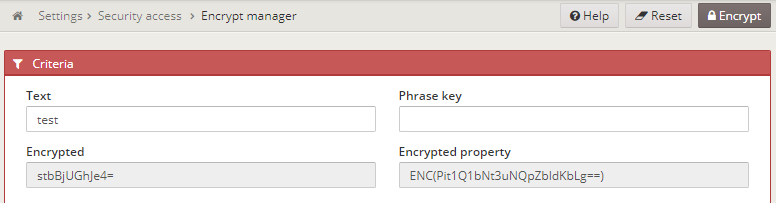
Once encoded, you just need to put it on any of your properties files and use it:
my.encoded.password=ENC(Pit1Q1bNt3uNQpZbldKbLg==)
ℹ️ The master key used to encode the properties is the
awe.security.master-keyproperty. It is required and has no default value: set it in your ownapplication.propertiesfile or in the environment.
⚠️ The
Phrase keyfield on theEncrypt utilscreen allows you to generate the encoded properties with other passwords, but don't forget that the encoded properties with a phrase key and theawe.security.master-keymust match to be decoded successfully.
Overwriting properties
You can overwrite any property of awe framework by adding it to your application.properties file of the project.
Awe has the same reading properties order than Spring (1. Is the highest preference).
- Devtools global settings properties on your home directory (
~/.spring-boot-devtools.propertieswhen devtools is active). @TestPropertySourceannotations on your tests.@SpringBootTest#propertiesannotation attribute on your tests.- Command line arguments.
- Properties from
SPRING_APPLICATION_JSON(inline JSON embedded in an environment variable or system property) ServletConfiginit parameters.ServletContextinit parameters.- JNDI attributes from
java:comp/env. - Java System properties (
System.getProperties()). - OS environment variables.
- A
RandomValuePropertySourcethat only has properties inrandom.*. - Profile-specific application properties outside of your packaged jar (
application-{profile}.propertiesand YAML variants) - Profile-specific application properties packaged inside your jar (
application-{profile}.propertiesand YAML variants) - Application properties outside of your packaged jar (
application.propertiesand YAML variants). - Application properties packaged inside your jar (
application.propertiesand YAML variants). @PropertySourceannotations on your@Configurationclasses.- Default properties (specified using
SpringApplication.setDefaultProperties).
Externalized configuration
If you need load the configuration from one external file, you have to consider:
AWE like SpringApplication will load properties from application.properties files in the following locations and add them to the Spring Environment:
- A
/configsubdirectory of the current directory - The current directory
- A classpath
/configpackage - The classpath root
Also, you can set spring.config.location environment property the run command.
java -jar myAweProject.jar --spring.config.location=file:/external_path/specific.properties
ℹ️ You can find more information about this in the Spring Boot reference documentation.