Validation
The validation action checks the conditions of each criterion with a value under the validation attribute. This action is related with a validate type button (see button actions).
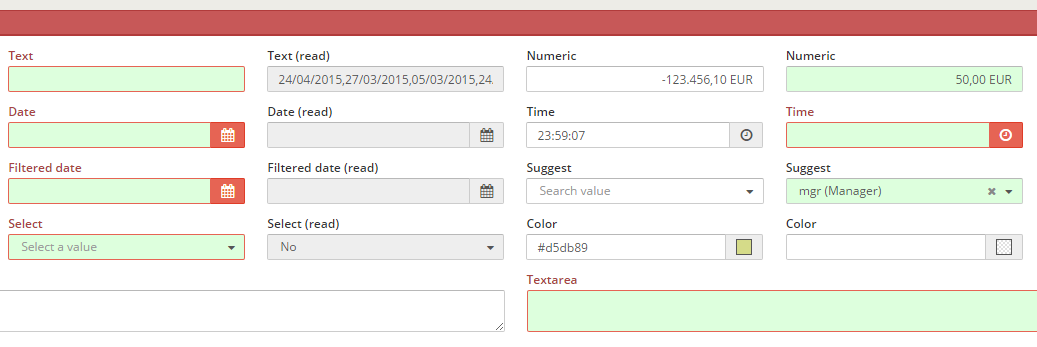
XML skeleton
<criteria [attributes] validation="[condition to validate]" />
Validation types
There are some kind of validation:
| Value of attribute | Component | Description | Examples |
|---|---|---|---|
| required | All except checkbox and radio | Check if the field has value | validation="{required:true}" |
| text | Text / Textarea / Password | Check if the value of the criteria is a text (Numbers and white spaces are not allowed) | validation="{text:true}" |
| textWithSpaces | Text / Textarea / Password | Check if the value of the criteria is a text (Numbers not allowed) | validation="{textWithSpaces:true}" |
| number | Text / Textarea / Password | Check if the value of the criteria is a number | validation="number" |
| integer | Text / Textarea / Password | Check if the value is a well-formed integer | validation="integer" |
| digits | Text / Textarea / Password | Check if the value is a number with only digits | validation="digits" |
| date | Text / Textarea / Password | Check if the value is a valid date | validation="date" |
| time | Text / Textarea / Password | Check if the value is a valid time (hour, minutes and seconds) | validation="time" |
Text / Textarea / Password | Check if the value is a valid string email | validation="email" | |
| gt | All except checkbox and radio | Check if the criterion value is greater than value | validation="{gt:value}" |
| ge | All except checkbox and radio | Check if the criterion value is greater or equal value | validation="{ge:value}" |
| lt | All except checkbox and radio | Check if the criterion value is lower than value | validation="{lt:value}" |
| le | All except checkbox and radio | Check if the criterion value is lower or equal than value | validation="{le:value}" |
| eq | All except checkbox and radio | Check if the criterion value is equal than value | validation="{eq:value}" |
| ne | All except checkbox and radio | Check if the criterion value is different than value | validation="{ne:value}" |
| mod | Numeric / Date / Time | Check if the criterion value is divisible by value | validation="{mod:value}" |
| range | Numeric / Date / Time | Check if the value is inside the range | validation="{range:{from:value, to:value}}" |
| equallength | Text / Textarea / Password | Check if the text length is equal to value | validation="{equallegth:value}" |
| maxlength | Text / Textarea / Password | Check if the text length is less than value | validation="{maxlegth:value}" |
| minlength | Text / Textarea / Password | Check if the text length is bigger than value | validation="{minlength:value}" |
| checkAtLeast | Checkbox / Button checkbox | Assure that there is at least value checked checkboxes in the group | validation="{checkAtLeast:value}" |
| pattern | Text / Textarea / Password | Check if the text is equal to the parameter | validation="{pattern:value}" |
Validation values
You can assign a simple static value to the validation comparator:
{eq:3}
... or you can take the value from a setting or a criterion:
{eq:{criterion:"CriterionId",type:"date"}}
These are the possible attributes on a value comparator:
| Value of attribute | Description | Examples |
|---|---|---|
| value | Constant value to compare with | value:5 |
| criterion | Retrieve the value from a criterion | criterion:"CriterionId" |
| setting | Retrieve the value from a setting | setting:"minlengthPassword" |
| message | Locale from message to retrieve if validation is not passed | message:"VALIDATION_MESSAGE_CUSTOM_ERROR" |
| type | Type of comparison | type:"type" |
Comparison types
You can define the type of the comparison, to check the values as a defined type:
| Type | Description |
|---|---|
| date | Compare as dates |
| integer | Compare as integer |
| float | Compare as floats |
| string | Compare as strings (default) |
Multiple validation
It is possible to have more than one validation actions under a single validation attribute. To do so, it is necessary to insert the validations in a json format:
{eq:{criterion:"Field1"},ne:{criterion:"Field2"}}
There is an exception with simple validation rules that have no parameters, such as required. In this case, it's not necessary to have the rule between {} brackets:
validation="required"
If you want to combine simple rules with complex rules, you need to define it as a complex rule as well:
{required:true, maxlength:{value:6, type:"integer"}}
Examples
Standard criteria with validation action
<criteria label="PARAMETER_TEXT" id="TxtReq" variable="TxtReq" component="text" style="col-xs-6 col-sm-3 col-lg-2" validation="{required:true, maxlength:4}"/>
Check that the password is valid
<criteria label="PARAMETER_PASSWD" id="Pas" component="text"
validation="{required: true, pattern:{setting:'passwordPattern'}, ne:{criterion:'OldPas', message:'VALIDATOR_MESSAGE_REPEAT_OLD_PASSWORD'}, minlength:{setting:'minlengthPassword'}}"
style="col2" />
Check if a date is greater or equal than another
<criteria label="PARAMETER_FILTERED_DATE" id="FilCalReq" variable="FilCalReq" component="filtered-calendar" initial-load="query"
target-action="FilCalDat" style="col-xs-6 col-sm-3 col-lg-2" validation="{required:true,ge:{criterion:'FilCal',type:'date'}}" strict="false" />