awe-107 Services
Services are the server-side extension point you use when queries or maintains alone are not enough. In practice, the usual path is a Java service wired through Services.xml, then exposed through a query or a maintain target.
Quick path
- Define the service in
global/Services.xml. - Implement the Java method as a Spring-managed service.
- Return
ServiceDatain the shape the caller expects. - Expose the service through a query or a maintain target.
- Treat non-Java integrations as advanced, environment-specific work.
Before you start
This tutorial assumes you already understand:
If your use case is simple CRUD over database tables, do not jump to a service too early. AWE descriptors already cover a lot. Reach for services when you need server-side logic, integration code, or behavior that does not fit a plain query or maintain definition.
Step 1: Understand where services fit
Services can back:
- queries that retrieve computed or external data
- maintain targets that need custom write logic
High-level flow:
screen action -> query or maintain -> service definition -> Java code
The service engine resolves the configured service and delegates to the appropriate implementation type.
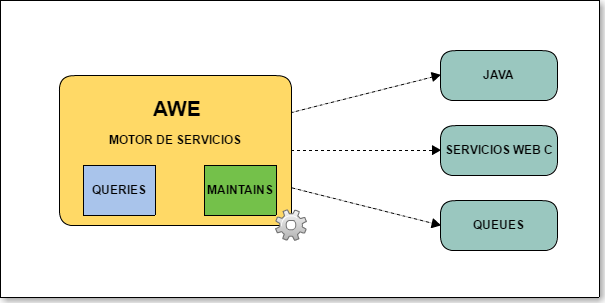
For the exhaustive service descriptor reference, use the canonical API docs:
Step 2: Define a Java service in global/Services.xml
Java services are the normal path for custom server-side logic in an AWE application.
<service id="MyJavaService">
  <java classname="com.app.services.MyService" method="concat">
    <service-parameter type="STRING" name="text1" />
    <service-parameter type="STRING" name="text2" />
  </java>
</service>
What this definition does:
- assigns the service id
MyJavaService - points to the class
com.app.services.MyService - calls the method
concat - maps two
STRINGparameters namedtext1andtext2
Step 3: Implement the Java service
The Java class must be available in the application classpath and managed by Spring.
In AWE, the usual service pattern is:
- extend
ServiceConfig - return
ServiceData - build the returned data in the shape expected by the calling query or maintain flow
Ejemplo:
package com.app.services;

import com.almis.awe.config.ServiceConfig;
import com.almis.awe.model.dto.DataList;
import com.almis.awe.model.dto.ServiceData;
import com.almis.awe.model.util.data.DataListUtil;
import org.springframework.stereotype.Service;

@Service
public class MyService extends ServiceConfig {

  /**
   * Concatenate two strings and expose the result as label/value.
   *
   * @param text1 First text
   * @param text2 Second text
   * @return Service response
   */
  public ServiceData concat(String text1, String text2) {
    String result = text1 + text2;

    ServiceData serviceData = new ServiceData();
    DataList dataList = new DataList();

    DataListUtil.addColumnWithOneRow(dataList, "label", result);
    DataListUtil.addColumnWithOneRow(dataList, "value", result);

    serviceData.setDataList(dataList);
    return serviceData;
  }
}
Important practical rules:
- the method must return
ServiceData - the returned column names must match what the calling query expects
- if the service is feeding a
select,suggest, or value-style flow,labelandvalueare the common output fields
Step 4: Expose the service through a query or maintain target
Service-backed query
If the service returns data to the UI, a query is usually the cleanest entry point.
<query id="MyConcatQuery" service="MyJavaService">
  <field id="label" alias="label" />
  <field id="value" alias="value" />
</query>
This query can then be consumed by a criterion, grid helper flow, or any other component expecting data.
Service-backed maintain
If the service performs a write or side effect, expose it through a maintain target.
<target name="RunMyService">
  <serve service="MyJavaService" />
</target>
This keeps the client-side action model consistent: buttons still call maintains or queries, and the maintain can delegate to Java when needed.
Advanced note: non-Java service integrations
Some AWE installations also use service definitions for external or legacy integrations such as microservices or C-based backends. That setup is more environment-specific than the Java path, so this tutorial keeps it light on purpose.
Example service definition:
<service id="ConcatString">
  <microservice name="alu-microservice" method="POST" endpoint="/data/CctStrDat">
    <service-parameter type="STRING" name="texto1" />
    <service-parameter type="STRING" name="texto2" />
  </microservice>
</service>
Use the service definition API as the canonical reference for those variants, and validate the exact integration contract against the application or platform you are extending.