Dialog
A dialog is a graphical item that provides the functionality of showing a modal window with a selected message and title (and an icon, if you want). A dialog should be associated to a button-action with type "dialog" (See button actions).
XML skeleton
<dialog id="[dialog-identifier]" label="[dialog-label]" icon="[dialog-icon]"
modal="[is-modal-screen]" style="[dialog-style]" help="[dialog-help]" on-close="[on-close]" deferred="[deferred]">
[define the content of the dialog]
</dialog>
Dialog structure
| Element | Use | Multiples instances | Description |
|---|---|---|---|
| dialog | Required | No | Global node of dialog. Defines the dialog attributes |
Dialog attributes
| Attribute | Use | Type | Description | Values |
|---|---|---|---|---|
| id | Optional | String | Dialog identifier. For reference purposes | |
| label | Optional | String | Dialog title | Note: You can use i18n files (locales) |
| icon | Optional | String | Icon identifier | Note: You can check all iconsets at icons screen |
| style | Optional | String | Style of the screen (css classes) | CSS classes separated by space (' ') |
| help | Optional | String | Help text you want to show | The name of a literal with the message |
| on-close | Optional | String | Behaviour of the stack after closing the dialog | accept (default), reject- Reject cancels the stack, accept continues executing stack actions |
| deferred | Optional | Boolean | Load the data of the components of the dialog the first time it is opened, not with the screen. See deferred loading | true, false (default) |
Note: You can add the styles
modal-lg,modal-mdormodal-smto change the width of the dialog.
Deferred loading
By default the server runs the initial-load queries of every component of the screen when it generates it, including the
components inside a dialog that may never be opened. With deferred="true" the data of the components of the dialog is
loaded the first time the dialog is opened, so a screen with heavy dialogs loads faster and sends a smaller response.
Without the attribute nothing changes. The AngularJS and the React clients behave the same way.
<dialog id="Summary" label="SCREEN_TEXT_SUMMARY" deferred="true">
<tag type="div" style="modal-body">
<criteria id="Customer" component="select" initial-load="query" target-action="CustomerList" label="PARAMETER_CUSTOMER"/>
<grid id="Orders" initial-load="query" target-action="OrderList" max="20">
...
</grid>
</tag>
</dialog>
What is deferred. The initial-load of every component inside the dialog, at any depth (criteria, grids, charts, tabs
and so on). The option lists of the columns of a grid (a select column with its own initial-load) are part of the
grid definition: they are still loaded with the screen.
When it loads. On the first opening, the client sends one silent deferred-data server action
with the identifier of the dialog. The server runs the queries of the components of the dialog and answers with an
initial-model client action for each of them, which applies the data like the screen
load does: the loaded model is also the one the restore and restore-target actions go back to. The dialog is not
loaded again when it is opened later. A component with autoload="true" inside the dialog waits for the first opening as
well.
The queries receive the values the screen has at the moment of the first opening, not the ones it had when it was loaded.
Before the first opening. The components of the dialog are on the screen, with their controller, but empty (no rows, no selected value). This is what every part of the screen sees:
| What | Behaviour before the first opening |
|---|---|
Values sent by actions (server, validate, print) | The components of the dialog are sent empty, as any empty criterion or grid. A query or maintain that depends on one of them must expect it empty until the dialog is opened. |
| Validation | The criteria of a dialog which was never opened are ignored by every validation rule (required and the rest), on validate actions, full or targeted: the user may not even be able to open it. Once opened and loaded, they validate as normal. |
Actions that give a component data (filter, server) | The data is kept. At the first opening, the components which already have rows or a selected value are not loaded again, so the dialog never overwrites what an action or a dependency did before. A selector which only had its value set still loads its options. |
| Dependencies targeting a component of the dialog | They work from the screen load, over the empty model, and the value they set is kept when the dialog loads. |
| Dependencies whose source is a component of the dialog | They are evaluated with the empty model, and again when the data of the dialog arrives (the same as after a screen load). |
| Dialogs inside a deferred dialog | A deferred dialog or tab page inside a deferred dialog waits for its own opening. A dialog which is not deferred loads with the outer one. |
Note: If the queries of the dialog fail, the error is shown as a message when the dialog is opened, not with the screen.
Validation of deferred containers
A deferred dialog or tab page that was never opened is not validated: its criteria and grids are skipped by the
validate action, whatever the rule (required, length, format...). A user may not have permission to open the dialog
(for example, the button that opens it is restricted by profile), so validation never blocks the screen for fields the
user cannot reach. The same applies to the save buttons that validate before running the server action.
- A full
validateskips every deferred container not opened yet. - A targeted
validate(<button-action type="validate" target="Panel"/>) of a container which holds an unopened deferred dialog or tab skips that part and validates the rest. - A targeted
validatewhose target is itself an unopened deferred container validates nothing and passes. - Once the container has been opened and loaded, its criteria validate as normal, in full and targeted validations.
The server does not check required for these criteria (it is a client rule), so a save does not fail because they are
missing. Remember it when a query or maintain needs a value of the dialog: it receives it empty until the dialog is opened.
Examples
Standard dialog with title, body and footer
This is an example with a dialog defined inside a modal tag in a screen. First of all, the action related to the dialog (by target attribute).
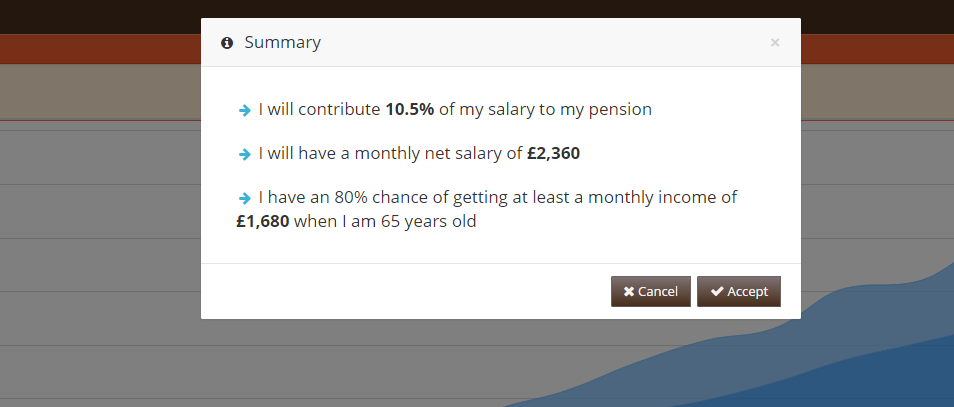
<button id="SetContribution" button-type="submit" label="BUTTON_SET_CONTRIBUTION" icon="floppy-o">
<button-action type="filter" target="Resume" />
<button-action type="dialog" target="Summary" />
</button>
<dialog id="Summary" label="SCREEN_TEXT_SET_CONTRIBUTION" icon="info-circle">
<tag type="div" style="modal-body scrollable">
<tag-list type="div" id="Resume" target-action="Resume" autoload="true">
<tag type="div" style="text-bg padding-sm">
<tag type="i" style="fa fa-arrow-right text-info fa-fw" />
<tag>
<text> [Value]</text>
</tag>
</tag>
</tag-list>
</tag>
<tag type="div" style="modal-footer">
<tag type="div" style="pull-right">
<button label="BUTTON_CANCEL" icon="close" id="ButDiaCan">
<button-action type="close" target="Summary" />
</button>
<button label="BUTTON_ACCEPT" icon="check" id="ButDiaVal" button-type="submit">
<button-action type="server" server-action="maintain" target-action="SetContribution" />
<button-action type="close" target="Summary" />
</button>
</tag>
</tag>
</dialog>
Standard dialog on a new screen
This example shows a dialog screen included in modal section of a window.
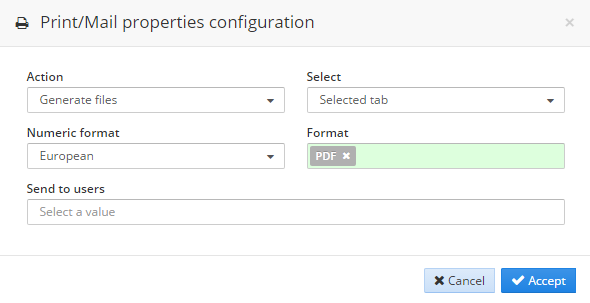
<button icon="print" label="BUTTON_PRINT" id="ButPrn" button-type="button">
<button-action type="validate"/>
<button-action type="dialog" target="PrnOpt"/>
</button>
<include target-screen="PrnOpt" target-source="center"/>
<screen xmlns:xsi="http://www.w3.org/2001/XMLSchema-instance" xsi:noNamespaceSchemaLocation="https://aweframework.gitlab.io/awe/docs/schemas/screen.xsd" template="window">
<tag source="center">
<dialog id="PrnOpt" modal="true" style="normal" label="SCREEN_TEXT_PRINT_EMAIL" icon="print" help="HELP_SCREEN_TEXT_PRINT_EMAIL">
<tag type="div" style="modal-body row">
[body content]
</tag>
<tag type="div" style="modal-footer">
[footer content]
</tag>
</dialog>
</tag>
</screen>