Resizable
A resizable is a container whose size the user can change by dragging one of its sides. Use it to let the user decide how much room a part of the screen takes, for example a list of items on the left of the detail that it controls.
XML skeleton
<resizable directions="[directions]" style="[style]">
  ...
</resizable>
A resizable can contain any screen element: tags, windows, grids, charts, criteria, other resizables...
Attributes
| Attribute | Use | Type | Description | Values / default |
|---|---|---|---|---|
| directions | Optional (set it) | String | Sides of the container that can be dragged | right, left, top, bottom. You can set several, separated by spaces |
| style | Optional | String | CSS classes of the container | See size and responsive styles |
| id | Optional | String | Identifier of the resizable. For reference purposes |
The schema does not force directions, but without it no engine draws a grabber, so the resizable cannot be
resized. Set it always.
The screen.xsd schema also declares icon, label and expandible for the resizable, but neither client uses
them.
Note: A resizable needs an initial width or height, defined with a CSS class in
style(for example thecol-xs-12 col-sm-4 col-lg-2grid classes). The resizable changes that size when the user drags the side.
Examples
Resizable with a grabber to the right
The resizable of the test screen MatTst: a grid on the left that the user can widen or narrow, next to another grid
that takes the rest of the space.
<tag type="div" style="expand expandible-horizontal">
  <resizable directions="right" style="col-xs-12 col-sm-4 col-lg-2 no-padding no-resizable-xs">
    <grid id="MatSel" style="expand grid-bordered" initial-load="query" server-action="data" target-action="QryUniTst" max="10">
      <column label="COLUMN_SIT" sort-field="Als" name="Als5" charlength="25" />
    </grid>
  </resizable>
  <grid id="MatPrn" style="expand grid-bordered" initial-load="query" server-action="data" target-action="QryUniTst" max="10">
    <column label="COLUMN_SIT" sort-field="Als" name="Als6" charlength="25" />
  </grid>
</tag>
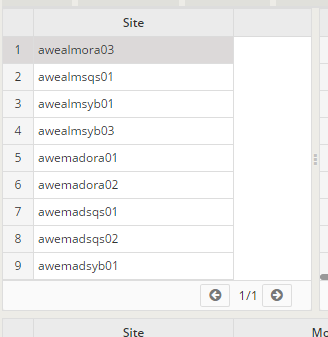
The parent tag has expandible-horizontal so the resizable and the second grid share the width (see
layout).
Resizable with a grabber at the bottom
The height-lg style gives the resizable its initial height (see the note above).
<tag type="div" style="expand expandible-vertical">
  <resizable directions="bottom" style="no-resizable-xs height-lg">
    <grid id="MatSel" style="expand grid-bordered" initial-load="query" server-action="data" target-action="QryUniTst" max="10">
      <column label="COLUMN_SIT" sort-field="Als" name="Als5" charlength="25" />
    </grid>
  </resizable>
  <grid id="MatCol" style="expand grid-bordered" initial-load="query" server-action="data" target-action="QryUniTst" max="10">
    <column label="COLUMN_SIT" sort-field="Als" name="Als17" charlength="25" />
  </grid>
</tag>
Both examples are adapted from the screen MatTst of the test applications (awe-tests/awe-boot and
awe-tests/awe-boot-react): the first one keeps its attributes, the second one only changes the contents of the
resizable.
Size and responsive styles
The resizable has a minimum size of 160 px and it cannot grow over 99% of its parent. These styles turn the grabber off when the screen is narrow, so on a phone the container uses its normal size:
| Style | The resizable stops being resizable when the screen is |
|---|---|
no-resizable-xs | narrower than 768 px |
no-resizable-sm | narrower than 992 px |
no-resizable-md | narrower than 1200 px |
no-resizable-lg | 1200 px wide or wider |
When the user releases the grabber the client launches a resize, so grids and charts inside the screen adapt to their new size.
How a drag shares the space
When the parent lays out along the dragged side (a right or left grabber in an expandible-horizontal parent, a top or
bottom grabber in an expandible-vertical one), the grabber works as a splitter: it follows the pointer, and only the
element next to it on that side (the next one for right and bottom, the previous one for left and top) gives or
takes the size that the resizable gains or loses. The other elements of the parent do not move.
The drag stops when either of the two reaches its minimum: the resizable does not get under 160 px, the element next to
it does not get under its own min-width or min-height, under 160 px (unless it was smaller already) or under its
content (a grid keeps its minimum rows area). After a drag both keep their size along that axis, and the other
expanding elements of the parent take the changes of the window size.
When the parent lays out across the dragged side, or there is no element next to the grabber, the drag only resizes the resizable.
AngularJS and React engines
Both engines draw the resizable in the same way: the container itself is resized by dragging the sides listed in
directions, and its children are stacked inside it. The no-resizable-* styles turn the handles off in both.
| Feature | AngularJS engine | React engine |
|---|---|---|
| What is dragged | The sides listed in directions of the container | The same |
| Several directions | Allowed (directions="right bottom") | Allowed |
| One or several children | The children are stacked inside the container | The same: the children are not split in panels |
| Element next to it | Gives or takes the size, the others do not move | The same |
no-resizable-* styles | Applied | Applied |
| Implementation | Own directive | Own component, same stylesheet rules |
The React engine used to split the children with a PrimeReact Splitter, so it had no
handle with a single child and it ignored no-resizable-*. It now behaves as the AngularJS engine. A screen that
relied on the splitter between two children (a drag border between two grids) must wrap each of them in its own
resizable.
Related pages
- Layout: how the container and its siblings share the space.
- Tags and window: the usual contents of a resizable.
- Screens: the list of screen elements.
Reviewed for AWE 5.