Side panel
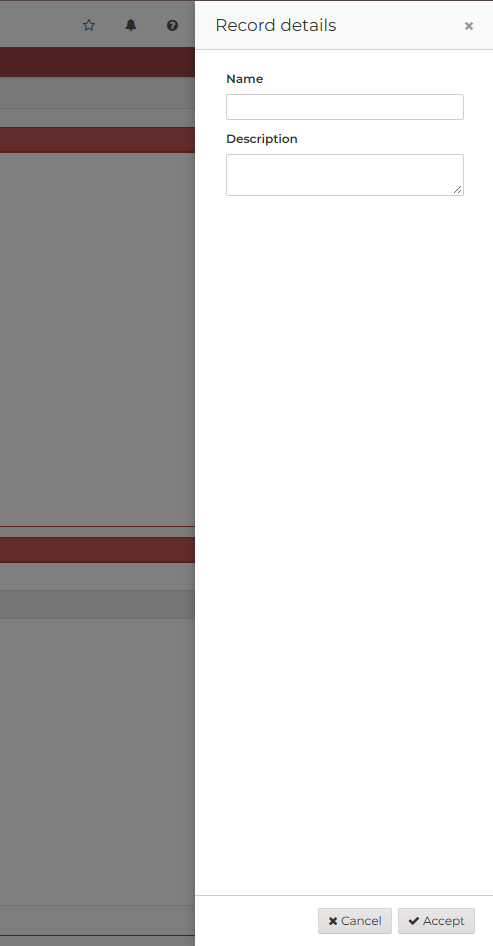
A side panel is a dialog anchored to the left or to the right edge of the screen, with a header, a body that
scrolls and an optional footer. Use it for content that the user consults or edits next to the screen (filters, details,
settings) without leaving it. It is opened and closed exactly like a dialog: with a button-action of type dialog (see
button actions), and with the close and close-cancel actions. Both web engines (AngularJS
and React) support it.
XML skeleton
<side-panel id="[panel-identifier]" label="[panel-label]" icon="[panel-icon]" style="[panel-style]"
            position="[left|right]" max-width="[css-length]" on-close="[on-close]" deferred="[deferred]">
  [define the content of the side panel]
  <tag type="div" style="modal-footer">
    [footer buttons]
  </tag>
</side-panel>
Side panel structure
| Element | Use | Multiples instances | Description |
|---|---|---|---|
| side-panel | Required | No | Global node of the side panel. Defines the side panel attributes |
Side panel attributes
| Attribute | Use | Type | Description | Values |
|---|---|---|---|---|
| id | Optional | String | Side panel identifier. The dialog, close and close-cancel actions target it | |
| label | Optional | String | Title of the header | Note: You can use i18n files (locales) |
| icon | Optional | String | Icon of the header (AngularJS engine) | Note: You can check all iconsets at icons screen |
| style | Optional | String | Style of the side panel (css classes) | CSS classes separated by space (' ') |
| position | Optional | String | Edge of the screen the side panel is anchored to | right (default), left |
| max-width | Optional | String | Maximum width of the side panel. It takes the whole width of the screen when the screen is narrower | A CSS length, for instance 30rem, 480px or 50vw. Default 40rem |
| on-close | Optional | String | Behaviour of the stack after closing the side panel with its close button, Esc or a click outside | accept (default), reject- Reject cancels the stack, accept continues executing stack actions |
| deferred | Optional | Boolean | Load the data of the components of the side panel the first time it is opened, not with the screen. See deferred loading | true, false (default) |
Opening and closing
The side panel opens with a dialog action whose target is the side panel, as a dialog does:
<button id="ButPnlRight" label="BUTTON_SIDE_PANEL_RIGHT" icon="arrow-left">
  <button-action type="dialog" target="PnlRight"/>
</button>
It closes:
- with a
closeaction (the actions after thedialogaction go on) or aclose-cancelaction (they are cancelled), usually in the buttons of its footer; - with the close button of its header, with Esc or with a click outside it. These follow the
on-closeattribute:accept(default) behaves asclose,rejectasclose-cancel.
Footer
Put the buttons of the side panel in a child tag with the modal-footer style. The header and the footer stay in view
and the body scrolls between them when its content is longer than the screen.
Focus
While the side panel is open, the keyboard focus stays inside it: Tab from its last control goes back to the first one (the close button of its header) and Shift+Tab from the first one goes to the last one. When the side panel closes, the focus goes back to the control that opened it.
Example
A side panel on the right edge, 30rem wide, with a footer, and a deferred side panel on the left edge, 20rem wide, which rejects the stack when it is dismissed:
<tag source="buttons">
  <button id="ButPnlRight" label="BUTTON_SIDE_PANEL_RIGHT" icon="arrow-left">
    <button-action type="dialog" target="PnlRight"/>
  </button>
  <button id="ButPnlLeft" label="BUTTON_SIDE_PANEL_LEFT" icon="arrow-right">
    <button-action type="dialog" target="PnlLeft"/>
  </button>
</tag>
<tag source="center">
  <window style="expand" label="SCREEN_TITLE_SIDE_PANEL" expandible="vertical">
    <tag type="div" style="panel-body">
      <criteria id="CrtPnlResult" label="PARAMETER_SIDE_PANEL_RESULT" component="text" readonly="true"
                style="col-xs-12 col-sm-6"/>
    </tag>
  </window>

  <side-panel id="PnlRight" label="SIDE_PANEL_TITLE_RIGHT" max-width="30rem">
    <tag type="div" style="panel-body">
      <criteria id="CrtPnlName" label="PARAMETER_NAME" component="text" style="col-xs-12"/>
      <criteria id="CrtPnlNotes" label="PARAMETER_DESCRIPTION" component="textarea" style="col-xs-12"/>
    </tag>
    <tag type="div" style="modal-footer">
      <button id="ButPnlRightCancel" label="BUTTON_CANCEL" icon="times">
        <button-action type="close-cancel" target="PnlRight"/>
      </button>
      <button id="ButPnlRightAccept" label="BUTTON_ACCEPT" icon="check">
        <button-action type="close" target="PnlRight"/>
        <button-action type="value" target="CrtPnlResult" value="accepted"/>
      </button>
    </tag>
  </side-panel>

  <side-panel id="PnlLeft" label="SIDE_PANEL_TITLE_LEFT" position="left" max-width="20rem" on-close="reject"
              deferred="true">
    <tag type="div" style="panel-body">
      <criteria id="CrtPnlLeftName" label="PARAMETER_NAME" component="text" style="col-xs-12"/>
    </tag>
    <tag type="div" style="modal-footer">
      <button id="ButPnlLeftClose" label="BUTTON_CLOSE" icon="times">
        <button-action type="close" target="PnlLeft"/>
      </button>
    </tag>
  </side-panel>
</tag>
With the builder module, SidePanelBuilder builds a <side-panel>:
new SidePanelBuilder()
  .setPosition(SidePanelPosition.LEFT)
  .setMaxWidth("20rem")
  .setOnClose(OnClose.REJECT)
  .setDeferred(true)
  .setId("PnlLeft")
  .setLabel("SIDE_PANEL_TITLE_LEFT");