Card
A card is a metric tile: a title, a big value with its unit, an icon, and a change (delta) with its trend arrow and a
caption, like Active customers · 1,284 · ↗ 4.2% vs. last month. It can also show a progress towards a target, a
description, a footer and, in its body, any other component (a chart, a grid, buttons...). Its attributes are static
values, and it is filled like a criterion: with initial-load="query" the first row of its query fills it. Both web
engines (AngularJS and React) support it.
XML skeleton
<card id="[card-identifier]" title="[card-title]" subtitle="[card-subtitle]" chip="[status-text]"
      chip-tone="[success|warning|danger|info|neutral]" icon="[card-icon]"
      icon-tone="[success|warning|danger|info|neutral]" value="[value]" unit="[unit]" number-decimals="[decimals]"
      delta="[delta]" delta-unit="[delta-unit]" trend="[up|down|flat]" good-trend="[up|down]"
      tone="[success|warning|danger|info|neutral]" caption="[caption]" target="[target]"
      description="[description]" footer="[footer]" style="[card-style]"
      initial-load="query" target-action="[query-identifier]" autorefresh="[seconds]">
  [optional body: any component, for instance a chart or a grid]
</card>
Card structure
| Element | Use | Multiples instances | Description |
|---|---|---|---|
| card | Required | No | Global node of the card. Defines the card attributes |
| Any component | Optional | Yes | Body of the card, shown below the value |
| dependency | Optional | Yes | Dependencies of the card, as in any component |
Anatomy
From top to bottom, a card shows only the parts that have a value:
| Part | Content |
|---|---|
| Header | title and subtitle on the left. On the right, the status chip followed by the icon tile or, when there is no icon, the delta |
| Value | value in big figures, followed by its unit |
| Body | The children of the card (a chart, a grid, buttons...) |
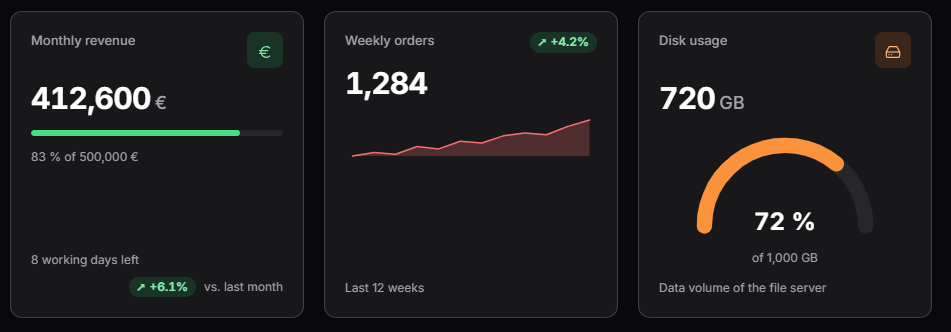
| Progress | A bar with the value against the target, and its text (82 % of 500,000 €) |
| Description | The description paragraph |
| Footer | The footer text on the left. On the right, the delta (when there is an icon) followed by the caption |
- With
icon, the delta goes to the footer; without it, the delta goes to the header. - The children go in the body below the value, they do not replace it. A card without
valueshows only its body.
Card attributes
| Attribute | Use | Type | Description | Values |
|---|---|---|---|---|
| id | Required | String | Card identifier. Actions and dependencies target it | |
| title | Optional | String | Title of the card. When there is no title, label is used | Note: You can use i18n files (locales) |
| label | Optional | String | Title of the card when title is not set | Note: You can use i18n files (locales) |
| subtitle | Optional | String | Secondary text below the title | Note: You can use i18n files (locales) |
| chip | Optional | String | Status shown as a tag with a dot at the top right. See status chip | Note: You can use i18n files (locales) |
| chip-tone | Optional | String | Colour of the status chip | success, warning, danger, info, neutral (default) |
| icon | Optional | String | Icon shown in a tile at the top right. With an icon the delta goes to the footer; without it, to the header | Note: You can check all iconsets at icons screen (users, mdi:name, lucide:name) |
| icon-tone | Optional | String | Colour of the icon tile and of the progress bar | success, warning, danger, info, neutral. Default: the primary colour |
| value | Optional | String | Main value. A number is formatted in the language of the user; any other text is shown as is | |
| unit | Optional | String | Unit or suffix of the value and of the target | %, €, ms... |
| number-decimals | Optional | Integer | Decimals of the value and of the target when they are numbers. The delta always keeps up to 2 decimals | Default: the decimals they have, up to 2 |
| delta | Optional | String | Change of the value (for example 4.2), shown as a tag with the trend arrow and its text. Without a numeric delta there is no tag | |
| delta-unit | Optional | String | Unit of the change. % is glued to the number (+12.4%), any other unit goes after a space (2.4 pt) | Default: % |
| trend | Optional | String | Direction of the change. When it is set, the delta is shown without sign | up, down, flat. Default: the sign of the delta |
| good-trend | Optional | String | Direction that is good news. See trend and tone | up (default), down (error rate, costs, response time) |
| tone | Optional | String | Tone of the change, used as is instead of the one derived from the trend | success, warning, danger, info, neutral |
| caption | Optional | String | Text next to the change (for example vs. last month) | Note: You can use i18n files (locales) |
| target | Optional | String | Target of the value. When the value and the target are numbers (and the target is not zero), a progress bar shows the value against it | |
| progress-style | Optional | String | How the progress towards the target is drawn | bar (default), gauge |
| sparkline | Optional | String | Series of numbers drawn as a small chart below the value, as a JSON array | [93.1,93.8,92.6]. The query can return it as a field |
| sparkline-type | Optional | String | Type of the sparkline | line, area (default), bar |
| description | Optional | String | Paragraph below the value and the body | Note: You can use i18n files (locales) |
| footer | Optional | String | Muted text at the bottom left of the card | Note: You can use i18n files (locales) |
| style | Optional | String | Style of the card (css classes) | CSS classes separated by space (' ') |
| initial-load | Optional | String | How the card gets its data when the screen is built. With query the first row of the target query fills the card | query |
| target-action | Optional | String | Query (or service) that fills the card | |
| server-action | Optional | String | Server action used to refresh the card data | data |
| autorefresh | Optional | Integer | Reloads the card data from the server every this many seconds | 0 or empty: no automatic refresh |
| autoload | Optional | Boolean | Reloads the card from the server as soon as it is created, after the screen is shown | true, false (default) |
Note: The schema also accepts
max, common to the components that load data, but the card only reads the first row.
Static attributes and query fields
The attributes of the card are static values. When the card has a query (initial-load="query" and target-action),
the first row of the query fills it: each field is named as the attribute in camelCase (title, subtitle, chip,
chipTone, icon, iconTone, value, unit, numberDecimals, delta, deltaUnit, trend, goodTrend, tone, caption,
target, description, footer).
- A field of the row wins over the attribute when it is present and not empty; otherwise the attribute is used. So the
XML can hold the fixed parts (
icon,unit,caption) and the query only the figures. - The title is
title, elselabel. - The texts (
title,subtitle,chip,caption,description,footer) can be locale keys or plain text.
Note: The tone of the change comes in the
tonefield. Thestylefield keeps holding the CSS classes of the card.
Status chip
The chip shows a status at the top right of the card, before the icon (or the delta), as a tag with a dot: Operational, At risk, Down... Its colour is
chip-tone (neutral when it is missing or unknown). There is one chip per card, and a card without chip text has no
chip.
Like any field, the query can return chip and chipTone, so the status changes when the card is refreshed. The
icon and iconTone fields can change with it:
<card id="CrdStatus" title="SCREEN_TEXT_SERVICE_STATUS" initial-load="query" target-action="ServiceStatus"
      autorefresh="60"/>
DataListUtil.addColumn(dataList, "chip", List.of("SCREEN_TEXT_DEGRADED"));
DataListUtil.addColumn(dataList, "chipTone", List.of("warning"));
DataListUtil.addColumn(dataList, "icon", List.of("lucide:triangle-alert"));
DataListUtil.addColumn(dataList, "iconTone", List.of("warning"));
DataListUtil.addColumn(dataList, "value", List.of(97.4));
DataListUtil.addColumn(dataList, "unit", List.of("%"));
Trend and tone
The delta tag has a direction (the trend) and a colour (the tone). They are decided in this order:
tonewins as is (success,warning,danger,infoorneutral).- Otherwise the tone comes from the trend. An explicit
trend(up,downorflat) wins, even against the sign of the delta. - Otherwise the trend is the sign of the delta: negative
down, zeroflat, positiveup.
Then good-trend maps the trend to the tone:
| Trend | good-trend="up" (default) | good-trend="down" |
|---|---|---|
up | success | danger |
down | danger | success |
flat | neutral | neutral |
- The sign of
valuenever matters: a negative value with a positive delta still goes up. - Without an explicit trend the delta is signed (
+4.2%,−4.2%,0%). With an explicit trend the arrow already tells the direction, so the delta is shown without sign (never↗ −4.2%).
Number formatting
value,deltaandtargetare numbers when they are finite (a number or a numeric text). They are formatted in the language of the user (1,284.5in English,1.284,5in Spanish).valueandtargetuse exactlynumber-decimalsdecimals when it is set; otherwise the decimals they have, up to 2.- The delta always keeps up to 2 decimals, whatever
number-decimalssays. - The progress is
round(value / target * 100)%. The bar is clamped between 0 and 100 %, the text shows the real percent. The bar takes the colour oficon-tone(the primary colour by default).
Sparkline and gauge
A card can draw small charts of its own, without a chart in its body:
- Sparkline:
sparklineis a series of numbers (a JSON array, from the XML or from a field of the query) drawn below the value across the whole width of the card, as an area (default), a line or bars (sparkline-type). It takes the colour oficon-tone. A series that is not a list of numbers draws nothing. - Gauge:
progress-style="gauge"draws the progress towards thetargetas a half circle with the percent in its middle, instead of the bar. The rules are the same as the bar (percent, clamp,icon-tonecolour); as the percent is in the arc, the text below only tells the target (of 1,000 GB).
<card id="CrdOrders" title="SCREEN_TEXT_ORDERS" value="1284" delta="4.2"
      sparkline="[980,1010,995,1060,1040,1105,1090,1150,1175,1160,1230,1284]"/>
<card id="CrdDisk" title="SCREEN_TEXT_DISK" icon="lucide:hard-drive" icon-tone="warning" value="720" unit="GB"
      target="1000" progress-style="gauge"/>
Card grid
Put the cards in a container with the awe-card-grid class to lay them out as a responsive grid: as many columns of
at least 16rem as fit, with a gap between them, and every card of a row stretched to the same height. It is a class
on any container, not a new tag:
<tag type="div" style="awe-card-grid">
  <card id="CrdCustomers" ... />
  <card id="CrdRevenue" ... />
  <card id="CrdErrors" ... />
</tag>
A card with a chart or a grid in its body needs more room: the awe-card-wide style makes it take two columns of the
grid (<card id="CrdSales" style="awe-card-wide">). On narrow screens the grid has a single column and the wide card
takes the whole row like the others.
Refresh
A card refreshes like any component that loads data:
- a
filteraction whose target is the card runs its query again; - a dependency with a
serveraction and the card astargetreloads it when its conditions are met (for instance, when a criterion changes); autorefreshreloads it every few seconds, and thereloadaction reloads the whole screen.
<button id="ButCrdReload" label="PARAMETER_RELOAD" icon="refresh">
  <button-action type="filter" target="CrdTstThemes"/>
</button>
Accessibility
- The card is a
sectionlabelled by its title. - The tone is not told by colour alone: the delta tag shows an arrow (
↗,↘or→), the delta text and a visually hidden label with the trend (Up, Down, No change), read by screen readers. - The status chip tells the status with its text; the dot and the colour only repeat it.
- The progress bar is a
progressbarwith its percent. - The card uses the colours of the theme, in light and dark mode.
Examples
Metric filled from a query
The XML holds the icon and the caption; the query returns the value and the delta. The delta is positive and there is
no explicit trend, so it goes up and is shown as success (↗ +12.5%):
<card id="CrdTstThemes" title="CARD_TST_THEMES" icon="lucide:palette" caption="CARD_TST_VS_LAST_MONTH"
      initial-load="query" target-action="CrdTstThemes"/>
<query id="CrdTstThemes">
  <table id="AweThm"/>
  <field id="IdeThm" function="CNT" alias="value"/>
  <constant value="12.5" alias="delta"/>
</query>
A Java service can return the whole card too, with the fields named in camelCase:
DataList dataList = new DataList();
DataListUtil.addColumn(dataList, "title", List.of("DASHBOARD_CARD_REVENUE"));
DataListUtil.addColumn(dataList, "value", List.of(412600));
DataListUtil.addColumn(dataList, "unit", List.of("€"));
DataListUtil.addColumn(dataList, "target", List.of(500000));
DataListUtil.addColumn(dataList, "delta", List.of(6.1));
DataListUtil.addColumn(dataList, "caption", List.of("DASHBOARD_CARD_VS_LAST_MONTH"));
return new ServiceData().setDataList(dataList);
Card with a chart in the body
The query of the card fills the header, the value and the footer; the chart below the value loads its own data. There is no icon, so the delta goes to the header:
<card id="CrdDshDeliveries" initial-load="query" target-action="DshCardDeliveries" number-decimals="1">
  <chart id="ChrDshDeliveries" type="areaspline" initial-load="query" target-action="DshCardDeliveriesTrend"
         label="DASHBOARD_CARD_DELIVERIES_TREND">
    <chart-legend enabled="false"/>
    <x-axis type="category"/>
    <y-axis/>
    <chart-tooltip suffix=" %" number-decimals="1"/>
    <chart-serie id="serie1" x-value="week" y-value="onTime" label="DASHBOARD_CARD_DELIVERIES_TREND"/>
  </chart>
</card>
Card whose good trend is down
For an error rate, going down is good news. With good-trend="down" the negative delta is shown as success
(↘ −0.18 pt):
<card id="CrdTstErrors" title="CARD_TST_ERRORS" value="0.42" unit="%" delta="-0.18" delta-unit="pt"
      good-trend="down" footer="CARD_TST_STATIC"/>